


VECTOR IN C++
-
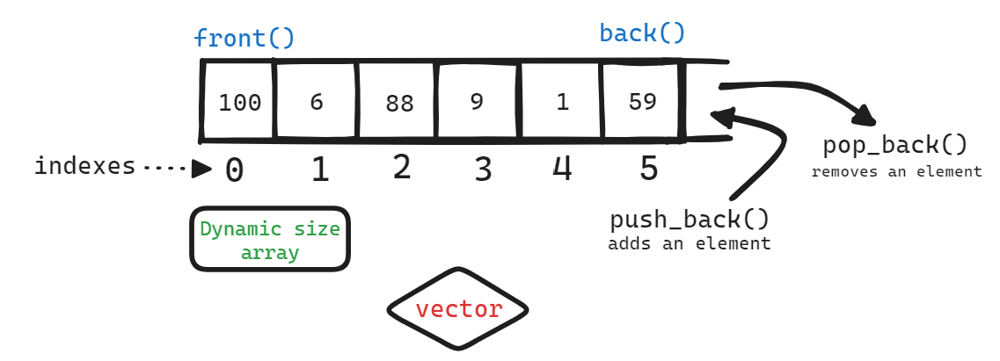
A vector is a dynamic array whose size can be changed automatically when an element is inserted or deleted.
-
Vector elements are stored in contiguous memory locations so that they can be accessed in constant time.
-
It is defined inside the
<vector>header file (also available in<bits/stdc++.h>).The complexity (efficiency) of common operations on vectors is as follows:
-
Random access - constant 𝓞(1).
-
Insertion or removal of elements at the end - amortized constant 𝓞(1).
-
Insertion or removal of elements in front or middle of the vector 𝓞(n).
Ways to declare a vector
Syntax
vector<int> vec; /* Empty */
vector<int> vec( size ); /* Vector with size 'size' */
vector<int> vec( size, value ); /* Vector with size 'size' and all elements with value 'value' */
vector<int> vec = { value1, value2, value3,...,valueN}; /* Vector with N values */
Examples
vector<int> vec; // Declares an empty vector with name as vec ---> []
vector<int> vec(5); // Declares vector of ints with size 5 and the default values assigned are 0s ---> [0,0,0,0,0]
vector<int> vec(5, 10); // Declares vector of ints with size 5 and values assigned are 10s ---> [10,10,10,10,10]
vector<int> vec = {1, 2, 3, 4}; // Declares vector with size 4 and values as ---> [1, 2, 3, 4]
vector<string> vect(5) ; // Declares vector with 5 empty strings ---> [“”, “”, “”, “”, “”, “”]
vector<string> vec(5, “Leetcode”); //Declares vector of strings with size 5 and values initialised are "Leetcode" ---> [“Leetcode”, “Leetcode”, “Leetcode”, “Leetcode”, “Leetcode”]
vector<vector<int>> vec(5);  // Declares vector of vectors ---> [[], [], [], [], []]
vector<vector<int>> vec(5, vector<int>(2)); // Declares vector of vectors(here inside vector size is 2 and default values assigned are 0's) ---> [[0,0], [0,0], [0,0], [0,0], [0,0]]
vector<vector<int>> vec(5, vector<int>(2, 10)); // Declares vector of vectors(here inside vector size is 2 and default values assigned are 10's) ---> [[10,10], [10,10],[10,10],[10,10],[10,10]]
Note : Similar syntax for char long long int float double long double and some other data types include user defined data types.
Ways to insert Elements into vector
Syntax
vec.push_back( ele ); /* adds an element 'ele' at the end and size of vector increases by 1    TC - 𝓞(1)*/
vec.emplace_back( ele ); /* adds an element 'ele' at the end and size of vector increases by 1   TC - 𝓞(1)*/
vec.insert( vec.begin() + i, ele ); /* Inserting element 'ele' at index i | Use i = 0 for inserting at front    TC - 𝓞(n)*/
vec.insert( vec.end(), vec2.begin(), vec2.end() ); /* Inserting the elements of vector 'v2' to the end of vector 'v'    TC - 𝓞(n)*/
Ways to delete elements from vector
Syntax
v.pop_back(); /* Remove element at end     TC - 𝓞(1)*/
v.erase( v.begin() + i ); /* Remove element at index i  or i = 0 to remove first element    TC - 𝓞(n)*/
v.erase( v.begin() + i, v.begin() + j ); /* Remove elements from index i to j-1     TC - 𝓞(n)*/
v.erase( remove( v.begin(), v.end(), value ), v.end() ); /* Removes all elements with value 'value' from the vector      TC - 𝓞(n)*/
Basic inbuilt Functions
Syntax
v.size(); /* returns the size of vector      TC - 𝓞(1)*/
v.resize( size, val ); /* If the 'size' is greater than previous size , then it adds elements with value 'val' at end and if 'size' is less than previous , then it removes from end*/
v.empty(); /* returns true if vector is empty    TC - 𝓞(1)*/
v.front(); or v[0]; /* Accessing first element    TC - 𝓞(1)*/
v.back(); or v[v.size()-1]; /* Accessing last element     TC - 𝓞(1) */
v[i]; /* Accessing element at i'th index (0-based)     TC - 𝓞(1)*/
v.at(i); /* Accessing element at i'th index (0-based)     TC - 𝓞(1)*/
v.clear(); /* Clears vector elements by making vector as empty     TC - 𝓞(n)*/

// Some algorithmic based functions
sort(v.begin(), v.end()); /* sorts vector elements in ascending order by default     TC - 𝓞(nlogn).*/
sort(v.begin(), v.end(), greater<int>); /* sorts vector elements in descending order    TC - 𝓞(nlogn).*/
reverse(v.begin(), v.end()); /* reverses vector elements     TC - 𝓞(n)*/
count(v.begin(), v.end(), x); /* returns the count of x in vector      TC - 𝓞(n)*/
min_element(v.begin(), v.end())-v.begin(); /* returns the minimum element's index(0-based) from the vector     TC - 𝓞(n) */
max_element(v.begin(), v.end())-v.begin();  /* returns the maximum element's index(0-based) from the vector     TC - 𝓞(n) */
*min_element(v.begin(), v.end()); /* returns the minimum element from the vector      TC - 𝓞(n)*/
*max_element(v.begin(), v.end());  /* returns the maximum element from the vector     TC - 𝓞(n) */
Note : The difference between the v[i] and v.at(i) is that 'at' will raise an exception if you try to access an element outside the vector while the [] operator won't.
Lets undertand by sample program
#include <bits/stdc++.h>
using namespace std;

int main() {

	vector<int> v = {1, 3, 2};// Create a vector containing integers ---> [1, 3, 2]

	// Insertion
	v.push_back(5) ; // Adding 5 at end ---> [1, 3, 2, 5]
	v.emplace_back(4) ; // Adding 4 at end ---> [1, 3, 2, 5, 4]
	v.insert(v.begin(), 10); //inserts 10 at begining ---> [10, 1, 3, 2, 5, 4]
	v.insert(v.begin()+3, 15); //inserts 15 at 3rd index ---> [10, 1, 3, 15, 2, 5, 4]

	// Deletion
	v.pop_back(); // removes an element at end ---> [10, 1, 3, 15, 2, 5]
	v.erase(v.begin()); // removes an element at front ---> [1, 3, 15, 2, 5]
	v.erase(v.begin() + 3); // removes an element at 3rd index ---> [1, 3, 15, 5]

	// Accessing and Updating
	int a = v[3]; // Here the variable a stores value at 3rd index i.e 5
	v[1] = 100; // Here the value at index 1 is updated with 100 ---> [1, 100, 15, 5]
	int last_element = v.back(); // i.e 5
	int first_element = v.front(); // i.e 1

	sort(v.begin(), v.end()); // sorts vector elements ---> [1, 5, 15, 100]
	reverse(v.begin(), v.end()); // reverses vector elements ---> [100, 15, 5, 1]

	// Traversing the vector using for loop
	for(int i = 0; i < v.size(); i++){
		cout << v[i] << " "; //After for loop, Output is: 100 15 5 1
	}
	int length = v.size() ; // Here the variable length stores vector size i.e 4
	v.clear() ; //vector is cleared ---> []
	bool isVectorEmpty = v.empty(); //Here the variable isVectorEmpty stores 'true' as the vector is empty

	return 0;
}
---------------------------------------------------------------------------------------------------------------------------------------------------------------------------------------------------------
STACK IN C++
- A stack is a linear data structure that follows the principle of Last In First Out (LIFO). This means the last element inserted inside the stack is removed first.
- It is defined inside
<stack>headerfile (also available in<bits/stdc++.h>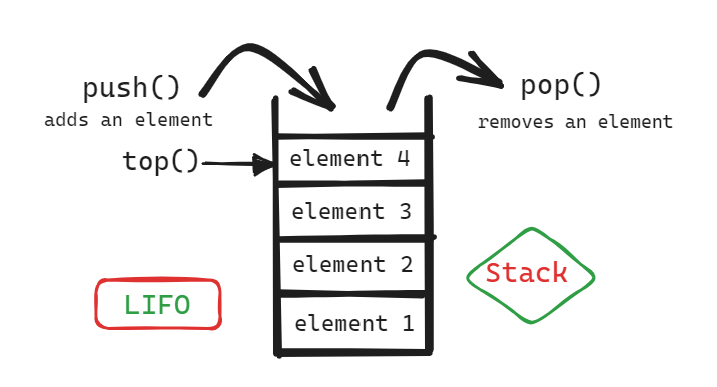
Declaring a stack
Syntax
stack< data_type > stack_name;
Examples
stack<int> stk; // stack of int's
stack<string> stk; // stack of strings
stack<pair<int, int>> stk; // stack of pairs
stack<vector<int>> stck; //stack of vectors
Note : Similar syntax for char long long int float double long double and some other data types include user defined data types.
Important functions on stack
stk.push(ele); // pushes an element  'ele' into stack       TC - 𝓞(1)
stk.pop(); // removes the top element    TC - 𝓞(1)
stk.top(); // returns the topmost element    TC - 𝓞(1)
stk.size(); // returns the size of stack    TC - 𝓞(1)
stk.empty(); // returns true if stack is empty else false    TC - 𝓞(1)
Note : The time complexity of all above inbuilt functions is constant - 𝓞(1)
Accessing stack elements
Since it won't provide indexing we can not directly access any element except top element.
The below is the way to traverse the stack.
while(!stk.empty()){
	cout << stk.top() << " ";
	stk.pop();
}
Lets understand by sample program
#include <bits/stdc++.h>
using namespace std;

int main() {
	stack<string> stk;

	//pushing data into the stack
	stk.push("Hi");
	stk.push("Hello");
	stk.push("How are you?");

	//poping data from top of the stack
	stk.pop(); // the top element i.e "How are you?" is removed;

	cout << stk.top() << " "; // prints top element "Hello"
	cout << stk.size() << " "; // prints 2
	cout << stk.empty(); //prints false | 0

	return 0;
}
---------------------------------------------------------------------------------------------------------------------------------------------------------------------------------------------------------
QUEUE IN C++
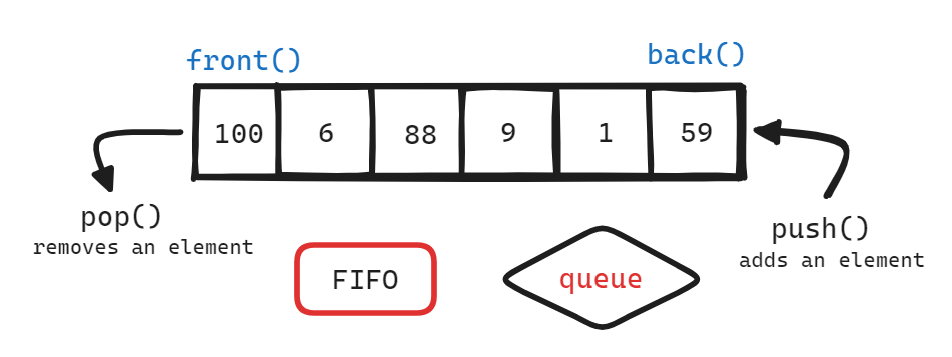
- A queue is a linear data structure that follows the FIFO (First In First Out) principle i.e elements that are added first will be removed first.
- It is defined inside
<queue>header file (also available in<bits/stdc++.h>)
Declaring a queue
Syntax
queue< data_type > queue_name;
Examples
queue<int> q; // queue of int's
queue<string> q; // queue of strings
queue<pair<int, int>> q; // queue of pairs
queue<vector<int>> q; //queue of vectors
Note : Similar syntax for char long long int float double long double and some other data types include user defined data types.
Important functions on queue
q.push(ele); // pushes an element  'ele' into queue from end       TC - 𝓞(1)
q.pop(); // removes an element from front of the queue   TC - 𝓞(1)
q.front(); // returns the first element    TC - 𝓞(1)
q.back(); // returns the last element    TC - 𝓞(1)
q.size(); // returns the size of queue    TC - 𝓞(1)
q.empty(); // returns true if queue is empty else false    TC - 𝓞(1)
Note : The time complexity of all above inbuilt functions is constant - 𝓞(1)
Accessing queue elements
Since it won't provide indexing we can not directly access any element except first and last element.
The below is the way to traverse the queue.
while(!q.empty()){
	cout << q.front() << " ";
	q.pop();
}
Lets understand by sample program
#include <bits/stdc++.h>
using namespace std;

int main() {

	queue<string> q;

	//pushing data into the queue
	q.push("Hi");
	q.push("Hello");
	q.push("How are you?");

	//poping data from top of the queue
	q.pop(); // the front element i.e "Hi" is removed;

	cout << q.front() << " "; // prints front element "Hello"
	cout << q.back() << " "; // prints front element "How are you?"
	cout << q.size() << " "; // prints 2
	cout << q.empty(); //prints false | 0

	return 0;
}
---------------------------------------------------------------------------------------------------------------------------------------------------------------------------------------------------------
DEQUE IN C++
- deque is an indexed sequence container that allows fast insertion and deletion at both its beginning and its end.
The complexity (efficiency) of common operations on deques is as follows: - Random access - constant O(1)
- Insertion or removal of elements at the end or beginning - constant O(1)
- Insertion or removal of elements - linear O(n)
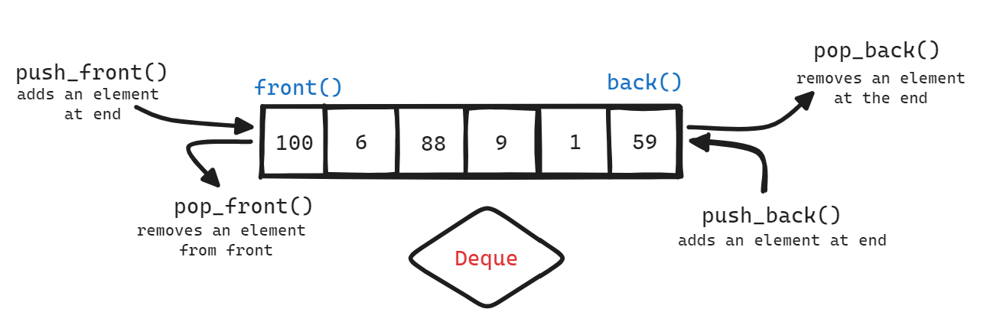
Formally Deque supports all the functions that vector supports
The Difference b/w deque & vector : Deques do not guarantee that their elements are contiguous in memory so that accessing may not be as efficient.
Ways to declare a deque
Syntax
deque<int> dq; /* Empty */
deque<int> dq( size ); /* deque with size 'size' */
deque<int> dq( size, value ); /* deque with size 'size' and all elements with value 'value' */
deque<int> dq = { value1, value2, value3,...,valueN}; /* deque with N values */
Note : Similar syntax for char long long int float double long double and some other data types include user defined data types.
Important Functions :
dq.push_back( ele ); /* adds an element 'ele' at the end and size of deque increases by 1    TC - 𝓞(1)*/
dq.pop_back(); /* Remove element at end     TC - 𝓞(1)*/
dq.push_front( ele ); /* adds an element 'ele' at the front and size of deque increases by 1    TC - 𝓞(1)*/
dq.pop_front(); /* Remove element at front     TC - 𝓞(1)*/
dq.size(); /* returns the size of deque      TC - 𝓞(1)*/
dq.empty(); /* returns true if deque is empty    TC - 𝓞(1)*/
dq.front(); or dq[0]; /* Accessing first element    TC - 𝓞(1)*/
dq.back(); or dq[dq.size()-1]; /* Accessing last element     TC - 𝓞(1) */
dq[i]; /* Accessing element at i'th index (0-based)     TC - 𝓞(1)*/
dq.at(i); /* Accessing element at i'th index (0-based)     TC - 𝓞(1)*/
Note : For more functions refer to vector methods writtten here.
---------------------------------------------------------------------------------------------------------------------------------------------------------------------------------------------------------
PRIORITY QUEUE IN C++
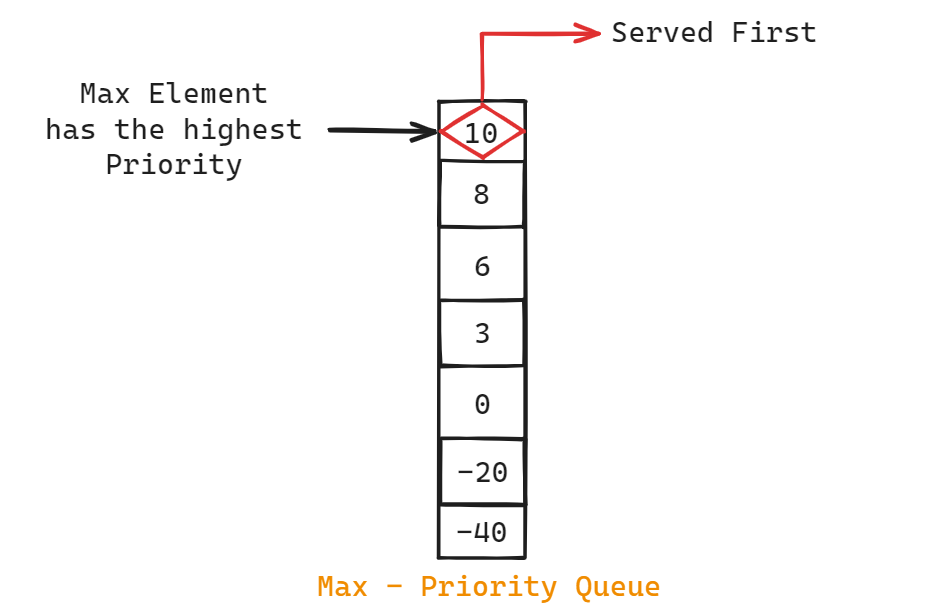
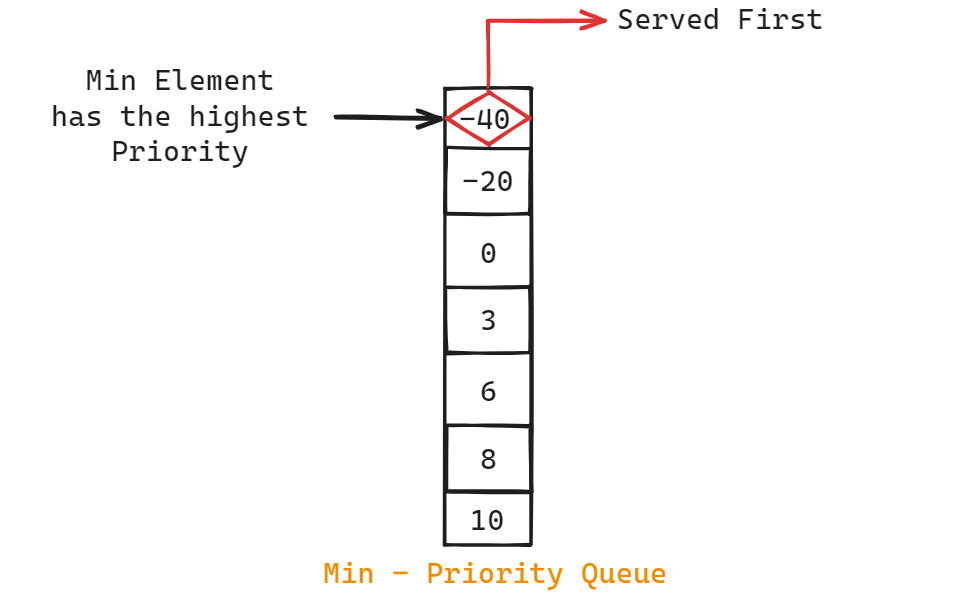
- A priority queue is a special type of queue in which each element is associated with a priority value and elements are served based on their priority.
- It is defined inside
<queue>headerfile (also available in<bits/stdc++.h>) - By default C++ creates max priority queue. We can change it to min priority queue by passing additional parameters during declaration.
Max Priority Queue
Min Priority Queue
Declaring a priority_queue
Syntax
Max - Priority Queue
priority_queue< data_type > priority_queue_name;
Min - Priority Queue
priority_queue< data_type, vector< data_type >, greater< data_type > > priority_queue_name;
Examples
// Max priority queue
priority_queue<int> q; // max priority_queue of int's
priority_queue<string> q; // max priority_queue of strings
priority_queue<pair<int, int>> q; // max priority_queue of pairs
priority_queue<vector<int>> q; // max priority_queue of vectors

// MIN Priority queue
priority_queue<int, vector<int>, greater<int>> q; // min priority_queue of int's
priority_queue<string, vector<string>, greater<string>> q; //  min priority_queue of strings
priority_queue<pair<int, int>, vector<pair<int, int>>, greater<pair<int, int>>> q; //  min priority_queue of pairs
priority_queue<vector<int>, vector<vector<int>>, greter<vector<int>>> q; // min priority_queue of vectors
Note : Similar syntax for char long long int float double long double and some other data types include user defined data types.
Important functions on priority_queue
pq.push(ele); // inserts the element into the priority queue      TC - 𝓞(logn)
pq.pop(); // removes the element with the highest priority   TC - 𝓞(logn)
pq.top(); // returns the element with the highest priority    TC - 𝓞(1)
pq.size(); // returns the size of priority_queue    TC - 𝓞(1)
pq.empty(); // returns true if priority_queue is empty else false    TC - 𝓞(1)
Accessing priority_queue elements
Since it won't provide indexing we can not directly access any element except top element.
The below is the way to traverse the priority_queue.
while(!pq.empty()){
	cout << pq.top() << " ";
	pq.pop();
}
Lets understand by sample program
#include <bits/stdc++.h>
using namespace std;

int main() {

	priority_queue<int> pq;

	//pushing data into the priority_queue
	pq.push(6);
	pq.push(10);
	pq.push(0);
	pq.push(-40);
	pq.push(8);
	pq.push(-20);
	pq.push(3);

	cout << pq.top() << " "; // prints top element i.e 10

	//poping data from top of the queue
	pq.pop(); // the top element i.e 10 is removed;

	cout << pq.front() << " "; // prints current top element i.e 8
	cout << q.size() << " "; // prints 6
	cout << q.empty(); //prints false | 0

	return 0;
}
---------------------------------------------------------------------------------------------------------------------------------------------------------------------------------------------------------
SET IN C++
- A set data structure won't allow duplicate keys.
- Keys are sorted in ascending order by default. We can also change the order by passing extra arguments during it's declaration.
- Implemented using Binary search tree( Red black trees)
Declaring set
Syntax
set< data_type > st; // stores keys in ascending order
set< data_type, greater< data_type > > st; // stores keys in descending order
Examples
set<int> st; //  set of int's
set<string> st; //  set of strings
set<pair<int, int>> st; //  set of pairs
set<vector<int>> st; //  set of vectors
Note : Similar syntax for char long long int float double long double and some other data types include user defined data types.
Important functions on priority_queue
st.insert( key ); // inserts the element into set (if not present)    TC - 𝓞(logn)
st.erase( key ); // removes the specified key if present   TC - 𝓞(logn)
st.find( key ); // returns an iterator points to the key, if key is not present returns st.end()   TC - 𝓞(logn)
st.size(); // returns the size of set    TC - 𝓞(1)
st.empty(); // returns true if set is empty else false    TC - 𝓞(1)
st.clear(); // removes all set elements     TC - O(n)
Accessing set elements
Since it won't provide indexing we can not directly access any element.
The below is the way to traverse the set.
for( auto x : st ){
	cout << x << " " ;  // prints each key in ascending order
}
Lets understand by sample program
#include <bits/stdc++.h>
using namespace std;

int main() {

	set<int> st;

	//inserting data into the set
	st.insert(1);    // inserts 1 into set
	st.insert(1);    // since 1 is already present , it won't insert 1 again into set
	st.insert(5);    // inserts 5 into set
	st.insert(10);   // inserts 10 into set
	st.insert(15);   // inserts 15 into set
	st.insert(5);     //  since 5 is already present , it won't insert 5 again into set

	if( st.find(100) != st.end()){
		cout << " Key is present " << " ";
	}
	else {
		cout << " Key is not present "; // prints key is not present
	}


	if( st.find(1) != st.end()){
		cout << " Key is present " << ; // prints key is present since 1 is presnt in set
	}
	else {
		cout << " Key is not present ";
	}

	st.erase(1); // 1 removed from set

	cout << st.size() << " "; // prints 3
	cout << q.empty(); //prints false | 0
	st.clear(); // removes all elements.

	return 0;
}
---------------------------------------------------------------------------------------------------------------------------------------------------------------------------------------------------------
UNORDERED SET IN C++
- An unordered_set is similar to set data structure and it won't allow duplicate keys.
- But the keys are not sorted by any order ( No order ) and hence we can't except the ordering of elements.
- Implemented using Hash Tables
- Faster in insertion / removal / find than set in average case i.e TC - O(1). ( worst case TC - O(n))
Declaring unordered_set
Syntax
unordered_set< data_type > st; Examples
unordered_set<int> st; //  unordered_set of int's
unordered_set<string> st; //  unordered_set of strings
unordered_set<pair<int, int>> st; //  unordered_set of pairs
unordered_set<vector<int>> st; //  unordered_set of vectors
Note : Similar syntax for char long long int float double long double and some other data types include user defined data types.
Important functions on priority_queue
st.insert( key ); // inserts the element into set (if not present)    AVG - TC - 𝓞(1) ,    Worst TC - O(n)
st.erase( key ); // removes the specified key if present    AVG - TC - 𝓞(1) ,    Worst TC - O(n)
st.find( key ); // returns an iterator points to the key, if key is not present returns st.end()   AVG - TC - 𝓞(1) ,    Worst TC - O(n)
st.size(); // returns the size of set    TC - 𝓞(1)
st.empty(); // returns true if set is empty else false    TC - 𝓞(1)
st.clear(); // removes all set elements     TC - O(n)
Accessing unordered_set elements
Since it won't provide indexing we can not directly access any element.
The below is the way to traverse the unordered_set.
for( auto x : st ){
	cout << x << " " ;  // prints each key in ascending order
}
Lets understand by sample program
#include <bits/stdc++.h>
using namespace std;

int main() {

	unordered_set<int> st;

	//inserting data into the set
	st.insert(1);    // inserts 1 into set
	st.insert(1);    // since 1 is already present , it won't insert 1 again into set
	st.insert(5);    // inserts 5 into set
	st.insert(10);   // inserts 10 into set
	st.insert(15);   // inserts 15 into set
	st.insert(5);     //  since 5 is already present , it won't insert 5 again into set

	if( st.find(100) != st.end()){
		cout << " Key is present " << " ";
	}
	else {
		cout << " Key is not present "; // prints key is not present
	}


	if( st.find(1) != st.end()){
		cout << " Key is present " << ; // prints key is present since 1 is presnt in set
	}
	else {
		cout << " Key is not present ";
	}

	st.erase(1); // 1 removed from set

	cout << st.size() << " "; // prints 3
	cout << q.empty(); //prints false | 0
	st.clear(); // removes all elements.

	return 0;
}
---------------------------------------------------------------------------------------------------------------------------------------------------------------------------------------------------------
MULTISET IN C++
- A multiset data structure allows multiple keys with same values.
- Keys are sorted in ascending order by default. We can also change the order by passing extra arguments during it's declaration.
- Implemented using Binary search tree( Red black trees)
Declaring multiset
Syntax
multiset< data_type > st; // stores keys in ascending order
multiset< data_type, greater< data_type > > st; // stores keys in descending order
Examples
multiset<int> st; //  multiset of int's
multiset<string> st; //  multiset of strings
multiset<pair<int, int>> st; //  multiset of pairs
multiset<vector<int>> st; //  multiset of vectors
Note : Similar syntax for char long long int float double long double and some other data types include user defined data types.
Important functions on priority_queue
st.insert( key ); // inserts the element into set     TC - 𝓞(logn)
st.erase( key ); // removes all occurences of specified key if present   TC - 𝓞(logn)
st.erase( st.find( key ) ); // removes only one occurence of specified key if present   TC - 𝓞(logn)
st.find( key ); // returns an iterator points to the key, if key is not present returns st.end()   TC - 𝓞(logn)
st.count( key ) ; // returns the frequency of specified key     TC - 𝓞(logn)
st.size(); // returns the size of multiset    TC - 𝓞(1)
st.empty(); // returns true if multiset is empty else false    TC - 𝓞(1)
st.clear(); // removes all multiset elements     TC - O(n)
Accessing set elements
Since it won't provide indexing we can not directly access any element.
The below is the way to traverse the set.
for( auto x : st ){
	cout << x << " " ;  // prints each key in ascending order
}
Lets understand by sample program
#include <bits/stdc++.h>
using namespace std;

int main() {

	multiset<int> st;

	//inserting data into the set
	st.insert(1);    // inserts 1 into set
	st.insert(1);    // inserts 1 into set
	st.insert(1);    // inserts 1 into set
	st.insert(5);    // inserts 5 into set
	st.insert(10);   // inserts 10 into set
	st.insert(15);   // inserts 15 into set
	st.insert(5);     // inserts 5 into set

	if( st.find(100) != st.end()){
		cout << " Key is present " << " ";
	}
	else {
		cout << " Key is not present "; // prints key is not present
	}


	if( st.find(1) != st.end()){
		cout << " Key is present " << ; // prints key is present since 1 is presnt in set
	}
	else {
		cout << " Key is not present ";
	}

	cout << st.count( 1 ) ; // prints 3

	st.erase( st.find(1) ); // removes one occurence of 1

	cout << st.count(1) ; // prints 2

	st.erase( 1 ); // removes all occurences of 1

	cout << st.count(1) ; // prints 0

	cout << st.size() << " "; // prints 4
	cout << st.empty(); //prints false | 0
	st.clear(); // removes all elements.

	return 0;
}
---------------------------------------------------------------------------------------------------------------------------------------------------------------------------------------------------------
UNORDERED MULTISET IN C++
- A unordered_multiset data structure allows multiple keys with same values.
- Keys are not sorted i.e No particular order
- Implemented using Hash Tables
Declaring multiset
Syntax
unordered_multiset< data_type > st; Examples
unordered_multiset<int> st; //  unordered_multiset of int's
unordered_multiset<string> st; //  unordered_multiset of strings
unordered_multiset<pair<int, int>> st; //  unordered_multiset of pairs
unordered_multiset<vector<int>> st; //  unordered_multiset of vectors
Note : Similar syntax for char long long int float double long double and some other data types include user defined data types.
Important functions on priority_queue
st.insert( key ); // inserts the element into set     AVG TC - 𝓞(1) ,     Worst TC - 𝓞(n)
st.erase( key ); // removes all occurences of specified key if present    AVG TC - 𝓞(1) ,     Worst TC - 𝓞(n)
st.erase( st.find( key ) ); // removes only one occurence of specified key if present    AVG TC - 𝓞(1) ,     Worst TC - 𝓞(n)
st.find( key ); // returns an iterator points to the key, if key is not present returns st.end()    AVG TC - 𝓞(1) ,     Worst TC - 𝓞(n)
st.count( key ) ; // returns the frequency of specified key      AVG TC - 𝓞(1) ,     Worst TC - 𝓞(n)
st.size(); // returns the size of multiset    TC - 𝓞(1)
st.empty(); // returns true if multiset is empty else false    TC - 𝓞(1)
st.clear(); // removes all multiset elements     TC - O(n)
Accessing set elements
Since it won't provide indexing we can not directly access any element.
The below is the way to traverse the set.
for( auto x : st ){
	cout << x << " " ;  // prints each key in ascending order
}
Lets understand by sample program
#include <bits/stdc++.h>
using namespace std;

int main() {

	unordered_multiset<int> st;

	//inserting data into the set
	st.insert(1);    // inserts 1 into set
	st.insert(1);    // inserts 1 into set
	st.insert(1);    // inserts 1 into set
	st.insert(5);    // inserts 5 into set
	st.insert(10);   // inserts 10 into set
	st.insert(15);   // inserts 15 into set
	st.insert(5);     // inserts 5 into set

	if( st.find(100) != st.end()){
		cout << " Key is present " << " ";
	}
	else {
		cout << " Key is not present "; // prints key is not present
	}


	if( st.find(1) != st.end()){
		cout << " Key is present " << ; // prints key is present since 1 is presnt in set
	}
	else {
		cout << " Key is not present ";
	}

	cout << st.count( 1 ) ; // prints 3

	st.erase( st.find(1) ); // removes one occurence of 1

	cout << st.count(1) ; // prints 2

	st.erase( 1 ); // removes all occurences of 1

	cout << st.count(1) ; // prints 0

	cout << st.size() << " "; // prints 4
	cout << st.empty(); //prints false | 0
	st.clear(); // removes all elements.

	return 0;
}
---------------------------------------------------------------------------------------------------------------------------------------------------------------------------------------------------------
MAPS IN C++
- A map is a data structure which stores elements in mapped fashion. Each element has a key value and mapped value. So basically it stores key-value pairs
- Keys are unique and sorted in ascending order by default.
- Implemented using BST ( Red black trees )
Declaring map
Syntax
map< key_data_type, value_data_type> mp; // keys are unique and sorted in ASC
Examples
map<int, int> mp;
map<int, string> mp;
map<int, vector<int>> mp;
map<string, vector<int>> mp;
Note : Similar syntax for char long long int float double long double and some other data types include user defined data types.
Important functions
mp[key] = value; // inserts key->value pair if not present. If present updates the key with current value.     TC - O(logn)
int a = mp[key]; // returns the value at the specified key. If key is not present it return default value and add key->default_value into map.      TC - O(logn)
mp.insert({key, value}); // inserts new key-value pair if key is not present. If present it won't add this key-value pair and even it won't update.
mp.insert(make_pair(key, value)); // inserts new key-value pair if key is not present. If present it won't add this key-value pair and even it won't update.
mp.insert(pair<int, int>(5, 7)); // inserts new key-value pair if key is not present. If present it won't add this key-value pair and even it won't update.
mp.erase(key); // removes the specified entry with specified key if present.      TC - O(logn)
mp.count(key); // returns frequency of key i.e 0 or 1      TC - O(logn)
mp.find( key ); // returns pos of key if present. else return mp.end()      TC - O(logn)
mp.clear(); // removes all entrys from the map      TC - O(n)
mp.size(); // returns the size of map      TC - O(1)
mp.empty(); // returns true if map is empty else false    TC - 𝓞(1)
Traversing through map
// first way
for(auto ele : mp){
		cout << ele.first << " " << ele.second << "\n";
}
// second way
for(auto it = mp.begin() ; it != mp.end() ; it++){
		cout << it->first <<  " " << it->second << "\n";
}
// third way
for(auto it = mp.rbegin() ; it != mp.rend() ; it++){
		cout << it->first << " " << it->second << "\n";
}
Lets understand by sample program
#include <bits/stdc++.h>
using namespace std;

int main() {
	// your code goes here
	map<int, int> mp; // creates empty map ---> []
	mp[5] = 10;    // since key = 5 is not present, adds the entry with key as 5 and value as 10 ---> [5->10]
	mp[5] = 9; // key = 5 is present hence it updates with current value ---> [5->9]
	mp.insert(pair<int, int>(3, 7)); // since k = 3 is not present adds the entry 3->7 ----> [3->7, 5->9]
	mp.insert(pair<int, int>(5, 8)); // since key = 5 is present it won't add and update the entry. ---> [3->7, 5->9]
	mp.insert(make_pair(8, 1)); // since key = 8 is not present adds the entry 8->1 ----> [3->7, 5->9, 8->1]
	mp.insert(make_pair(8, 2)); // since key = 8 is present it won't add and update the entry. ---> [3->7, 5->9, 8->1]
	mp.insert({6, 11}); // since key = 6 is not present adds the entry 6->11 ----> [3->7, 5->9, 6->11, 8->1]
	mp.insert({6, 99}); // since key = 6 is present it won't add and update the entry. ---> [3->7, 5->9, 6->11, 8->1]
	cout << "size is " << mp.size() << "\n"; // prints 4
	mp.erase(5); // removes entry whose key = 5 i.e 5->9. ---> [3->7, 6->11, 8->1]
	mp.erase(100); // removes entry whose key = 100, but there is no entry matching this. So nothing will happen. ---> [3->7, 6->11, 8->1]
	cout << "value at key = 8 is " << mp[8] << "\n"; // prints the value at key = 8 i.e 1
	cout << "value at key = 99 is " << mp[99] << "\n"; // since there is no key = 99 it adds entry 99->0 (0 is default value) and prints 0. ---> [3->7, 6->11, 8->1, 99->0]
	cout << "Frequency of entry whose key = 3 is " << mp.count(3) << "\n";

	if(mp.find(12) != mp.end()) cout << "Key = 12 is present \n";
	else cout << "key = 12 is not present\n";

	if(mp.find(99) != mp.end()) cout << "Key = 99 is present \n";
	else cout << "key = 99 is not present\n";

	// printing map
	cout << "map entry's are: \n" ;
	for(auto it = mp.begin() ; it != mp.end() ; it++){
		cout << it->first << "->" << it->second << "\n";
	}
	return 0;
}
Output of above program
size is 4
value at key = 8 is 1
value at key = 99 is 0
Frequency of entry whose key = 3 is 1
key = 12 is not present
Key = 99 is present
map entry's are:
3->7
6->11
8->1
99->0
---------------------------------------------------------------------------------------------------------------------------------------------------------------------------------------------------------
UNORDERED MAPS IN C++
- A unordered_map is a data structure which stores elements in mapped fashion. Each element has a key value and mapped value. So basically it stores key-value pairs
- Keys are unique and not have a particular order
- Implemented using Hash tables
Declaring map
Syntax
unordered_map< key_data_type, value_data_type> mp; // keys are unique and not have a particular order
Examples
unordered_map<int, int> mp;
unordered_map<int, string> mp;
unordered_map<int, vector<int>> mp;
unordered_map<string, vector<int>> mp;
Note : Similar syntax for char long long int float double long double and some other data types include user defined data types.
Important functions
mp[key] = value; // inserts key->value pair if not present. If present updates the key with current value.     AVG TC - O(1), Worst TC - O(n)
int a = mp[key]; // returns the value at the specified key. If key is not present it return default value and add key->default_value into map.     AVG TC - O(1), Worst TC - O(n)
mp.insert(make_pair(key, value)); // inserts new key-value pair if key is not present. If present it won't add this key-value pair and even it won't update.     AVG TC - O(1), Worst TC - O(n)
mp.insert({key, value}); // inserts new key-value pair if key is not present. If present it won't add this key-value pair and even it won't update.      AVG TC - O(1), Worst TC - O(n)
mp.insert(pair<int, int>(5, 7)); // inserts new key-value pair if key is not present. If present it won't add this key-value pair and even it won't update.      AVG TC - O(1), Worst TC - O(n)
mp.erase(key); // removes the specified entry with specified key if present.      AVG TC - O(1), Worst TC - O(n)
mp.count(key); // returns frequency of key i.e 0 or 1      AVG TC - O(1), Worst TC - O(n)
mp.find( key ); // returns pos of key if present. else return mp.end()      AVG TC - O(1), Worst TC - O(n)
mp.clear(); // removes all entrys from the map      TC - O(n)
mp.size(); // returns the size of map      TC - O(1)
mp.empty(); // returns true if map is empty else false    TC - 𝓞(1)
Traversing through map
// first way
for(auto ele : mp){
		cout << ele.first << " " << ele.second << "\n";
}
// second way
for(auto it = mp.begin() ; it != mp.end() ; it++){
		cout << it->first <<  " " << it->second << "\n";
}
// third way
for(auto it = mp.rbegin() ; it != mp.rend() ; it++){
		cout << it->first << " " << it->second << "\n";
}
Lets understand by sample program
#include <bits/stdc++.h>
using namespace std;

int main() {
	// your code goes here
	unordered_map<int, int> mp; // creates empty map ---> []
	mp[5] = 10;    // since key = 5 is not present, adds the entry with key as 5 and value as 10 ---> [5->10]
	mp[5] = 9; // key = 5 is present hence it updates with current value ---> [5->9]
	mp.insert(pair<int, int>(3, 7)); // since k = 3 is not present adds the entry 3->7 ----> [5->9, 3->7] (Note: order is not expected)
	mp.insert(pair<int, int>(5, 8)); // since key = 5 is present it won't add and update the entry. ---> [3->7, 5->9] (Note: order is not expected)
	mp.insert(make_pair(8, 1)); // since key = 8 is not present adds the entry 8->1 ----> [3->7, 5->9, 8->1] (Note: order is not expected)
	mp.insert(make_pair(8, 2)); // since key = 8 is present it won't add and update the entry. ---> [3->7, 5->9, 8->1] (Note: order is not expected)
	mp.insert({6, 11}); // since key = 6 is not present adds the entry 6->11 ----> [3->7, 5->9, 6->11, 8->1] (Note: order is not expected)
	mp.insert({6, 99}); // since key = 6 is present it won't add and update the entry. ---> [6->11, 8->1, 5->9, 3->7] (Note: order is not expected)
	cout << "size is " << mp.size() << "\n"; // prints 4
	mp.erase(5); // removes entry whose key = 5 i.e 5->9. ---> [3->7, 8->1, 6->11] (Note: order is not expected)
	mp.erase(100); // removes entry whose key = 100, but there is no entry matching this. So nothing will happen. ---> [3->7, 6->11, 8->1] (Note: order is not expected)
	cout << "value at key = 8 is " << mp[8] << "\n"; // prints the value at key = 8 i.e 1
	cout << "value at key = 99 is " << mp[99] << "\n"; // since there is no key = 99 it adds entry 99->0 (0 is default value) and prints 0. ---> [3->7, 6->11, 8->1, 99->0] (Note: order is not expected)
	cout << "Frequency of entry whose key = 3 is " << mp.count(3) << "\n";

	if(mp.find(12) != mp.end()) cout << "Key = 12 is present \n";
	else cout << "key = 12 is not present\n";

	if(mp.find(99) != mp.end()) cout << "Key = 99 is present \n";
	else cout << "key = 99 is not present\n";

	// printing map
	cout << "map entry's are: \n" ;
	for(auto it = mp.begin() ; it != mp.end() ; it++){
		cout << it->first << "->" << it->second << "\n";
	}
	return 0;
}
Output of above program
size is 4
value at key = 8 is 1
value at key = 99 is 0
Frequency of entry whose key = 3 is 1
key = 12 is not present
Key = 99 is present
map entry's are:
99->0
6->11
8->1
3->7
---------------------------------------------------------------------------------------------------------------------------------------------------------------------------------------------------------
MULTIMAPS IN C++
- A multimap is a data structure which stores elements in mapped fashion. Each element has a key value and mapped value. So basically it stores key-value pairs
- Multimap is similar to a map with the addition that multiple elements can have the same keys.
- Keys are sorted in ascending order by default.
- Implemented using BST ( Red black trees )
Declaring multimap
Syntax
multimap< key_data_type, value_data_type> mp; // keys are sorted in ASC
Examples
multimap<int, int> mp;
multimap<int, string> mp;
multimap<int, vector<int>> mp;
multimap<string, vector<int>> mp;
Note : Similar syntax for char long long int float double long double and some other data types include user defined data types.
Important functions
mp.insert(make_pair(key, value)); // inserts new key-value pair      TC - O(logn)
mp.insert({key, value}); // inserts new key-value pair       TC - O(logn)
mp.insert(pair<int, int>(5, 7)); // inserts new key-value pair       TC - O(logn)
mp.erase(key); // removes all the occurences entry's with specified key if present.      TC - O(logn)
mp.erase(mp.find(key)); // removes one occurence of entry with specified key if present.      TC - O(logn)
mp.count(key); // returns frequency of key      TC - O(logn)
mp.find( key ); // returns pos of key if present. else return mp.end()      TC - O(logn)
mp.clear(); // removes all entrys from the map      TC - O(n)
mp.size(); // returns the size of map      TC - O(1)
mp.empty(); // returns true if map is empty else false    TC - 𝓞(1)
Traversing through map
// first way
for(auto ele : mp){
		cout << ele.first << " " << ele.second << "\n";
}
// second way
for(auto it = mp.begin() ; it != mp.end() ; it++){
		cout << it->first <<  " " << it->second << "\n";
}
// third way
for(auto it = mp.rbegin() ; it != mp.rend() ; it++){
		cout << it->first << " " << it->second << "\n";
}
Lets understand by sample program
#include <bits/stdc++.h>
using namespace std;

int main() {
	// your code goes here
	multimap<int, int> mp; // creates empty map ---> []

	mp.insert(pair<int, int>(3, 7)); // adds the entry 3->7 ----> [3->7]
	mp.insert(pair<int, int>(5, 8)); // adds the entry 5->8---> [3->7, 5->8]
	mp.insert(make_pair(8, 1)); // adds the entry 8->1.---> [3->7, 5->8, 8->1]
	mp.insert(make_pair(8, 2)); // adds the entry 8->2.---> [3->7, 5->8, 8->1, 8->2]
	mp.insert({6, 11}); // adds the entry 6->11.---> [3->7, 5->8, 6->11, 8->1, 8->2]
	mp.insert({6, 99}); // adds the entry 6->11.---> [3->7, 5->8, 6->11, 6->99, 8->1, 8->2]
	mp.insert({6, 15}); // adds the entry 6->15.---> [3->7, 5->8, 6->11, 6->99, 6->15, 8->1, 8->2]
	cout << "size is " << mp.size() << "\n"; // prints 7
	cout << "Frequency of entry whose key = 6 is " << mp.count(6) << "\n";
	auto it = mp.begin();
	while(it != mp.end()){
		if(it->first == 6 && it->second == 11) break;
		it++;
	}
	mp.erase(it); // removes entry that 'it' points i.e 6->11. ---> [3->7, 5->8, 6->99, 6->15, 8->1, 8->2]
	cout << "Frequency of entry whose key = 6 after removing one occurence is " << mp.count(6) << "\n";
	mp.erase(6); // removes all occurences of entry's whose keys = 6 ---> [3->7, 5->8, 8->1, 8->2]
	cout << "Frequency of entry whose key = 6 after removing all occurences is " << mp.count(6) << "\n";
	mp.erase(100); // since there is no key = 100, nothing will be removed ---> [3->7, 5->8, 8->1, 8->2]

	if(mp.find(12) != mp.end()) cout << "Key = 12 is present \n";
	else cout << "key = 12 is not present\n";

	if(mp.find(8) != mp.end()) cout << "Key = 8 is present \n";
	else cout << "key = 99 is not present\n";

	// printing map
	cout << "map entry's are: \n" ;
	for(auto it = mp.begin() ; it != mp.end() ; it++){
		cout << it->first << "->" << it->second << "\n";
	}
	return 0;
}
Output of above program
Success #stdin #stdout 0.01s 5424KB
size is 7
Frequency of entry whose key = 6 is 3
Frequency of entry whose key = 6 after removing one occurence is 2
Frequency of entry whose key = 6 after removing all occurences is 0
key = 12 is not present
Key = 8 is present
map entry's are:
3->7
5->8
8->1
8->2
---------------------------------------------------------------------------------------------------------------------------------------------------------------------------------------------------------
UNORDERED MULTIMAPS IN C++
- A unordered_multimap is a data structure which stores elements in mapped fashion. Each element has a key value and mapped value. So basically it stores key-value pairs
- Multimap is similar to a map with the addition that multiple elements can have the same keys.
- Keys are not sorted i.e no particular order.
- Implemented using Hash Tables
Declaring multimap
Syntax
unordered_multimap< key_data_type, value_data_type> mp; // keys are not sorted i.e no particular order
Examples
unordered_multimap<int, int> mp;
unordered_multimap<int, string> mp;
unordered_multimap<int, vector<int>> mp;
unordered_multimap<string, vector<int>> mp;
Note : Similar syntax for char long long int float double long double and some other data types include user defined data types.
Important functions
mp.insert(make_pair(key, value)); // inserts new key-value pair      AVG - TC - O(1), Worst O(n)
mp.insert({key, value}); // inserts new key-value pair       AVG - TC - O(1), Worst O(n)
mp.insert(pair<int, int>(5, 7)); // inserts new key-value pair      AVG - TC - O(1), Worst O(n)
mp.erase(key); // removes all the occurences entry's with specified key if present.      AVG - TC - O(1), Worst O(n)
mp.erase(mp.find(key)); // removes one occurence of entry with specified key if present.      AVG - TC - O(1), Worst O(n)
mp.count(key); // returns frequency of key      AVG - TC - O(1), Worst O(n)
mp.find( key ); // returns pos of key if present. else return mp.end()     AVG - TC - O(1), Worst O(n)
mp.clear(); // removes all entrys from the map      TC - O(n)
mp.size(); // returns the size of map      TC - O(1)
mp.empty(); // returns true if map is empty else false    TC - 𝓞(1)
Traversing through unordered_multimap
// first way
for(auto ele : mp){
		cout << ele.first << " " << ele.second << "\n";
}
// second way
for(auto it = mp.begin() ; it != mp.end() ; it++){
		cout << it->first <<  " " << it->second << "\n";
}
// third way
for(auto it = mp.rbegin() ; it != mp.rend() ; it++){
		cout << it->first << " " << it->second << "\n";
}
Lets understand by sample program
#include <bits/stdc++.h>
using namespace std;

int main() {
	// your code goes here
	unordered_multimap<int, int> mp; // creates empty map ---> []

	mp.insert(pair<int, int>(3, 7)); // adds the entry 3->7 ----> [3->7](Note: Order of elements is not expected)
	mp.insert(pair<int, int>(5, 8)); // adds the entry 5->8---> [3->7, 5->8] (Note: Order of elements is not expected)
	mp.insert(make_pair(8, 1)); // adds the entry 8->1.---> [3->7, 5->8, 8->1] (Note: Order of elements is not expected)
	mp.insert(make_pair(8, 2)); // adds the entry 8->2.---> [3->7, 5->8, 8->1, 8->2] (Note: Order of elements is not expected)
	mp.insert({6, 11}); // adds the entry 6->11.---> [3->7, 5->8, 6->11, 8->1, 8->2] (Note: Order of elements is not expected)
	mp.insert({6, 99}); // adds the entry 6->11.---> [3->7, 5->8, 6->11, 6->99, 8->1, 8->2] (Note: Order of elements is not expected)
	mp.insert({6, 15}); // adds the entry 6->15.---> [3->7, 5->8, 6->11, 6->99, 6->15, 8->1, 8->2] (Note: Order of elements is not expected)
	cout << "size is " << mp.size() << "\n"; // prints 7
	cout << "Frequency of entry whose key = 6 is " << mp.count(6) << "\n";
	auto it = mp.begin();
	while(it != mp.end()){
		if(it->second == 11) break;
		it++;
	}
	mp.erase(it); // removes the entry that 'it' points i.e 6->11. ---> [3->7, 5->8, 6->99, 6->15, 8->1, 8->2]
	cout << "Frequency of entry whose key = 6 after removing one occurence is " << mp.count(6) << "\n";
	mp.erase(6); // removes all occurences of entry's whose keys = 6 ---> [3->7, 5->8, 8->1, 8->2]
	cout << "Frequency of entry whose key = 6 after removing all occurences is " << mp.count(6) << "\n";
	mp.erase(100); // since there is no key = 100, nothing will be removed ---> [3->7, 5->8, 8->1, 8->2]

	if(mp.find(12) != mp.end()) cout << "Key = 12 is present \n";
	else cout << "key = 12 is not present\n";

	if(mp.find(8) != mp.end()) cout << "Key = 8 is present \n";
	else cout << "key = 99 is not present\n";

	// printing map
	cout << "map entry's are: \n" ;
	for(auto it = mp.begin() ; it != mp.end() ; it++){
		cout << it->first << "->" << it->second << "\n";
	}
	return 0;
}
Output of above program
size is 7
Frequency of entry whose key = 6 is 3
Frequency of entry whose key = 6 after removing one occurence is 2
Frequency of entry whose key = 6 after removing all occurences is 0
key = 12 is not present
Key = 8 is present
map entry's are:
5->8
3->7
8->2
8->1