


📜 Table of Contents
- What is Bit Manipulation?
- How to Convert a Number to Bitwise form?
- Long Code for Int → Binary Conversion
- Template for Conversion from Number → Binary
- Converting from Binary back to a Number
- Template for Conversion from Binary → Number
- Complements in Bit Manipulation
- Positive and Negative Bitwise
- Constraint of Bitwise
- Operators in Bit Manipulation
- Checking Whether a Number is Even or Odd
- Swapping Two Numbers Without Using a Third variable
- Checking if the i'th Bit is Set or Not
- Checking Number of Set Bits
- Checking if a Number is a Power of 2
- Finding the Number of Bitflips to Convert a Number
- Finding All the Prime Factors of a Number
- Finding the Number that Appears Once (Single Number)
- Finding Multiple Single Numbers in a Set
- Finding the XOR of numbers from the range 1 to N
- Kindly upvote ⬆️ this as it takes me a lot of time to write such posts so it'll work as a motivation for me to keep posting such in depth analysis about other topics as well 😇.
🔍 What is Bit Manipulation?
- Bit Manipulation refers to the process of converting numbers in the form of binary numbers 0s and 1s and then operating over them.
- The Bitwise Form of a Number is known as the Number in its Binary form. For example - the Bitwise Form of
13is1101. - In the Bitwise Form of a Number , the
1'sare also commonly known as set bits. - Remember that in general Binary Numbers are 0 or 1 :
- 0 False
- 1 True
🤔 How to Convert a Number to Bitwise Form?
- To find the value of any number for example
13
in bits we have to keep dividing it by 2 and count the remainders1or0. And at the end we count it from the bottom to top , i.e in reverse order from top. When counting the remainders, start from the least significant bit (the bottom) and read upward to form the binary representation. For the above example this looks like :
2 | 13 | 1 |
|---|---|---|
2 | 6 | 0 |
2 | 3 | 1 |
1 | 1 |
- This gives us
1011, and now we count it in reverse order. - Since an int is a
32bit datatype so13is known as1101but it actually is(00000…… 01101)where the total number of bits are32(i.e28 zeroesbefore1101).
📜 Long Code for Int Binary Conversion
C++
Python
Java
string decimalToBinary(int n) {
    string binary = "";
    while (n > 0) {
        binary += (n % 2 == 1) ? '1' : '0'; // Append '1' if odd, else '0'
        n /= 2; // Divide by 2 to process next bit
    }
    return binary;
}
📌 Template for Conversion from Number Binary
C++
Python
Java
#define numtobin(n) bitset<32>(n).to_string()
/* string z = numtobin(n) gives z as binary of n but not reversed
This macro is pseudo-code and may require adjustments
for specific C++ implementations. */- If you need the reversed or actual binary number then you can simply add
reverse(s.begin(),s.end());function in the end to reverse the string. - Note This can be inefficient for large numbers and using sstringstream instead would be optimal.
🔄 Converting from Binary back to a Number
- Now if we want to find the number from the bits we start counting the index from the element on the right and take
(whatever no. is on that position.) This looks like :
C++
Python
Java
int binaryToDecimal(string binary) {
    int decimal = 0, power = 1; // power represents 2^i
    for (int i = binary.length() - 1; i >= 0; i--) {
        if (binary[i] == '1')
            decimal += power; // Add power if bit is '1'
        power *= 2; // Move to the next power of 2
    }
    return decimal;
}- We can write a code with
- Time Complexity–
- Space Complexity –
- For converting a number from Binary Integer we can write a code with :
- Time Complexity --
- Space Complexity -–
- The code for this is :
C++
Python
Java
int binaryToDecimal(string binary) {
    int power = 1, decimal = 0; // power represents 2^i
    for (int i = binary.length() - 1; i >= 0; i--) {
        if (binary[i] == '1')
            decimal += power; // Add power if bit is '1'
        power *= 2; // Move to the next power of 2
    }
    return decimal;
}
📑 Template for Conversion from Binary Number
C++
Python
Java
#define bintoint(bin_str) stoi(bin_str, nullptr, 2)
// int z = bintoint(s); returns int form of bitwise s stored in z.
⚡ Complements in Bit Manipulation
- 1’s complement of a number means taking the binary number format of a number and then converting its 0’s to 1’s (0 1) and vice versa.
- This is similar to the NOT Operator
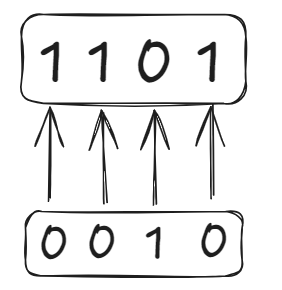
~we use which flip the bits which is discussed below. - Using 1's complement for binary form of
13looks like :
- For 2’s complement of a number means adding
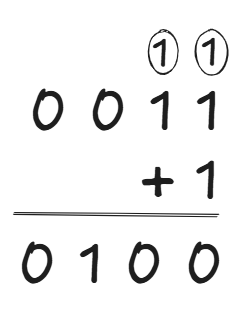
1to its one’s complement i.e one’s complement + 1 ; like for0010it will be0011. - But For example on adding + 1 to
0011we get0100, as it looks like :
- Here the
1gets carried over duringadding + 1.
😃 Positive and Negative Bitwise
- When the number is represented as a bit the left-most bit stores the sign of the integer i.e
0for Positive1for Negative
- Therefore, to store the negative value of any element first
take its positive value then apply2’scomplement on it. - For example : to store
-5we first take the bit value of5in a8bit system for instance i.e00000101. - Complement it –
11111010. Add1 – 11111011. Which results in-1 (11111011).
🚧 Constraint of Bitwise
- The largest integer (32 bits) that we can store is
(01111…1), 0 at start as the first element represents the integer being positive. The value of(01111..1)is known as INT_MAX i.e the maximum value int can store which is . - Similarly INT_MIN =
(1000…0)which is . - To get INT_MIN we simply take the 2’s complement of INT_MAX.
⚙️ Operators in Bit Manipulation
- AND (&) :
- All True True
- One False False
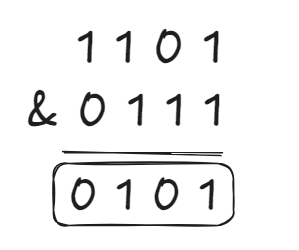
- Here we have added
- 13
(1101)& 7(0111)to get 5(0101).
- OR(|) :
- One True True
- All False False
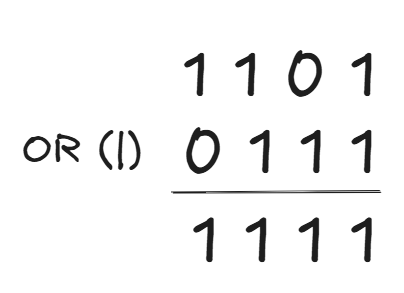
- Here we have added
- 13
(1101)and 7(0111)to get 15(1111).
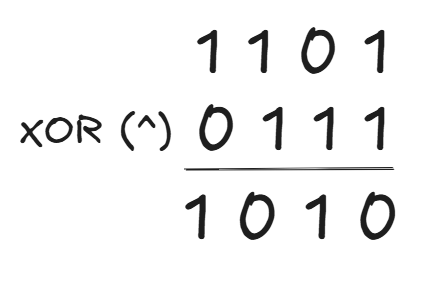
- XOR(^) :
- Number of 1’s is odd 1
- Number of 1’s is even 0
a = a ^ bis read as - (a is equal to a XOR b)a = (b ^ a) ^ agives usb. i.e(b ^ a ) ^ a = b.a ^ a = 0
- Note The bitwise or of the arrays always keeps increasing and the bitwise & of the arrays always keeps decreasing.
- Right Shift(>>) :
- For example :
13 >> 1means removing one bit from the right of13. i.e13is1101so13 >> 1 = 110which is 6. Similarly13 >> 2 = 11which is3. - For any
x >> k = x/2k, Like13 >> 2 = 13/22 = 3.
- Left Shift :
- For example :
13 << 1 - We shift all bits to the left and fill the rightmost positions with 0’s like :
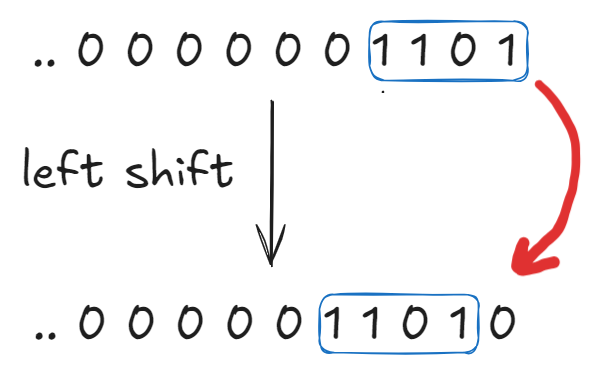
13 << 1 = 26i.e(11010).- Left shift doesn’t mean removing bits.
n << k = n * 2k- If we left shift
INT_MAX >> 1then this causes an overflow.
- NOT(~) :
- The NOT operator (~) simply flips all bits in the number’s two’s complement representation. It does not perform any extra steps like checking for negativity.
- For finding the NOT of a number like 6.
- ~
(110)=(001).
🤖 Checking Whether a Number is Even or Odd
- To check whether a number is an even number or odd we can simply use & Operator as for any number N , N & 1 returns 1 or true if the numbers is odd and 0 or false if the number is even.
- This is so as the Least Significant Bit (Right-most bit) determines whether a number is even or odd.
C++
Java
Python
if (n & 1)
    cout << "Odd";
else
    cout << "Even";
🔥 Swapping Two Numbers Without using a Third Variable
- We can do this simply by using XOR operator , as we have studied earlier for two variables
aandbwe use just use the approach :
a = a ^ b;
b = a ^ b;
a = a ^ b;- Note Use the XOR swap method with caution if both variables refer to the same memory location, as it can lead to unexpected behavior.
👀 Checking if the i'th Bit is Set or Not
- A bit is set if it's stored as 1.
- To check if the 1st bit of
13is set, we traverse from the back of the number in bitset format. - The statement for this is that for any number
N,
if((N & (1 << i)) != 0)then it’s a set bit, else its not. - Basically how this works is that we get a number using
1 << iin which 1 is at the ith position of the number so on using (N & the number) we get 1 at that position in the resultant only if it’s a set.
🧠 Checking Number of Set Bits
C++
Python
Java
class Solution {
public:
    int hammingWeight(int n) {
        return __builtin_popcount(n); // Counts the number of set bits (1s)
    }
};
💡 Checking if a Number is a Power of 2
- Here is a 1 Line Approach to check whether a Number is a Power of 2.
- Simply check for the condition
(n & (n - 1)) == 0and also account for the edge cases such asn = 0andn = INT_MIN.
C++
Python
Java
class Solution {
public:
    bool isPowerOfTwo(int n) {
    return n == 0 ? false : n == INT_MIN ? false : (n&(n-1)) == 0;
    }
};
🤯 Finding the Number of Bitflips to Convert a Number
- This means the minimum number of bits we need to change to reach another desired number. Now to find this minimum number we just need to XOR (^) the number
Nand the desired number it has to be converted to, the resultant we receive after using XOR on these two numbers has the same number of 1’s as the numbers of bitflips we are supposed to do. i.e after XOR’ing the two numbers we can run a for loop traversing through the 31 bits and check- if
(ans& (1 << i))thencnt++.
- if
C++
Python
Java
int countBitFlips(int N, int M) {
    int xor_result = N ^ M; // XOR gives bits that are different
    int cnt = 0;
    for (int i = 0; i < 31; i++) {
        if (xor_result & (1 << i)) { // Check if the i-th bit is set
            cnt++;
        }
    }
    return cnt;
}
📊 Finding All the Prime Factors of a Number
- Brute Force -> The Brute Force Method is to just traverse from
2 upto Nand initialise a list and check keep checking in the loop if the number is a factor of N and if it is a prime, if it satisfies both these conditions then it is added to this list.- This has a Time Complexity :
- Better Approach -> A Better Approach is traversing in range upto as a factor of N cannot be greater than .
- This approach has Time Complexity :
- Optimal Approach -> The optimal approach which is similar to the better approach but using bit manipulation has -
- Time Complexity : and is written below :
C++
Python
Java
vector<int> getPrimeFactors(int n) {
    vector<int> factors;
    // Check divisibility by 2
    if ((n & 1) == 0) {
        factors.push_back(2);
        while ((n & 1) == 0) n >>= 1; // Divide by 2 using right shift
    }
    // Check for odd factors
    for (int i = 3; i * i <= n; i += 2) {
        while ((n % i) == 0) {
            factors.push_back(i);
            n /= i;
        }
    }
    if (n > 1) factors.push_back(n); // If n is prime
    return factors;
}- After the loop, if
n > 1, add n as a factor to ensure that the prime factor (which might be greater than ) is included. - Here we basically keep adding every number to the list and if a new number is a factor of the previous number then it is not added.
- For example : once
2is added , any multiple of2will not be added in the list. But as this loop is only traversing upto it won’t countNbeing a prime factor of itself so we run an if loop in the end to check if the number is a prime factor of itself and add it to the list.
🎯 Finding the Number that Appears Once (Single Number)
- To find a number that appears only once in an array of duplicate numbers. The approach to find it using a hashmap has :
- Time Complexity .
- The optimal approach is using XOR operator as we know that
a ^ a = 0so we can just XOR all the numbers and the duplicates will be XOR’ed to give0whereas the single number will be the only remaining one. - The link to this question is 136. Single Number.
C++
Python
Java
class Solution {
public:
    int singleNumber(vector<int>& nums) {
    int xorr = 0;
    for (int i = 0 ; i < nums.size() ; i++) {
        xorr = xorr ^ nums[i];
        }
    return xorr;
    }
};
🌀 Finding Multiple Single Numbers in a Set
- We can basically XOR all the numbers of the set and the number that we receive at the end i.e the XOR of the two numbers which occur odd number of times.
C++
Python
Java
class Solution {
public:
    vector<int> twoOddNumbers(vector<int>& nums) {
        int xorr = 0;
        for (int num : nums) {
            xorr ^= num;
        }
        // Find the rightmost set bit
        int rightmost_bit = xorr & -xorr;
        int num1 = 0, num2 = 0;
        // Divide numbers into two groups
        for (int num : nums) {
            if (num & rightmost_bit) num1 ^= num;
            else num2 ^= num;
        }
        return {num1, num2};
    }
};
⚔️ Finding the XOR of numbers from the range 1 to N –
- Brute Force -> The brute force method is to run a For loop from
1 upto Nand keep XOR’ing it , this has
Time Complexity – . - Optimal Approach -> The optimal approach is that basically when we take elements in range N , then on dividing N by 4 we observe a pattern if –
a.)N % 4 == 0thenans = N.
b.)N % 4 == 1thenans = 1.
c.)N % 4 == 2thenans = N + 1.
d.)N % 4 == 3thenans = 0. - This approach has :
- Time Complexity :
- Space Complexity : .
- But incase the starting range is not
1, instead the given range is[L,R]then we can basically XOR two numbers using the above method , the two numbers beingL - 1andR. - As –
(1 ^ 2 ^ 3 ^ 4 ^ 5)^(1 ^ 2 ^ 3)==(4 ^ 5)as XOR’ing the same number gives us0, so we can XORL - 1andRto get the resultant XOR , i.eL - R.
Comments (6)