


Part- 1 https://leetcode.com/discuss/interview-question/720013/Android-Mobile-System-Design-(May-be-useful-for-iOS)-Part-1
Part- 2 YOU ARE READING!
Building Whatsapp features
As everyone are familiar with tha app features, lets shortlist few to begin our design.
Requirements
- Show Chats
- One-to-One Chat
- Last Seen / Online / Typing... status
- Image / File Sharing
- A Message status - Pending / Received / Delivered / Read
We are focusing only on basic one-to-one communication features.
Let's start with the image below
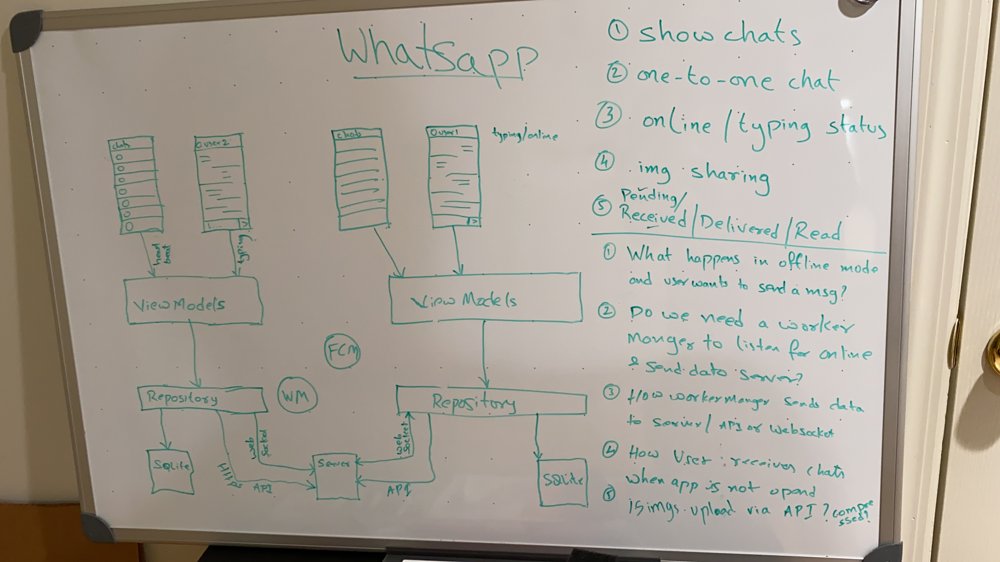
Approach
Note: On application starting, the app makes Websocket connection with the server. And there will be a heartbeat msgs running between the server every couple of seconds that server knows when the user was lastseen/ currently online.
Each point below is respective to the requirements above.
-
All messages are stored in SQLite database. When the user open the apps, ViewModel requests Repository for Friends and respective last conversation with them. As these are LiveData objects, we are notified when there is a data change. We can also see is any of the firends are typing... . We get this information from Socket to Repository to ViewModel.
-
When the user selects a conversation, the chat activity opens and view model loads latest messages by requesting the repository. ViewModel also listens for new messages as they are LiveData objects from Room/SQLite. While user sends a text msg, it flows via ViewModel-Repository-SQLite. From SQLite, it will be loaded back to view as pending. New job will created, that sends the msg to the server, simultaneously updating it's status on the SQLite. Which in turn updates the view.
-
When the user starts typing, the event is sent to server via ViewModel-Repository-WebSocket-Server. Server sends this event to the the Friend over socket if he is connect to the server. We see the lastseen/online/typing same way. If we are in offline mode, the app repeatedly tries to connect and you can see the "connecting..." status.
-
This is a broad topic all together. Involves compression, video trimming, time limits, recoring etc. All that needs a seperate discussion. But, let's assume we have the file ready to send for simplicity. First we make a copy into out app's storage memory, and save that path as a msg in the SQLite. This will handle the preview for the view immediately. We can use Glide/Picasso or any ImageLoading library to load the images efficiently. Then we are ready to upload it to the server. We upload the file to the server using "Multipart" POST request using Retrofit. Then we get a url for the file which is part of the message.
-
When the SQLite stores our message to friend, the message status is pending(Time icon). As the background task sends it to the server successfully, the message satus changes to the Received (Single check mark). One the other end, if the friend is connected, the sever sends that message over Socket and receives the acknowledgement or sends a FCM msg to friend and waits for acknowledgement. The server also sents this delivered status(Double check mark) to us via websocket/FCM. As the user open the chat, it updates the time and all messages as read(Blue double check mark) and sends an acknowledgment to the server. We get notified via WebSocket/FCM which helps us to update the SQLite and then Views.
Models may look like
class User {
	long userId;
	String name;
	String profilePicUrl;
	long lastseen; // timestamp
	String activity; // 0-idle, 1-typing, 2-recording
}
class Message {
int id;
long userId;
String text;
String fileUrl;
long timestamp;
int status; // 0-Pending, 1-Received, 2-Delivered, 3-Read
}Let me know if you have any questions.
Each feature that is discussed above can be elaborated and deserves more attention.