


Introduction to Design Patterns :
Design patterns are proven solutions to recurring problems in software design. They are best practices that help developers solve common design issues in a flexible, reusable, and efficient manner. Design patterns are not code but templates that guide developers in creating scalable and maintainable software. They are typically categorized into three main types:
1.) Creational Patterns : Deal with object creation mechanisms (e.g., Singleton, Factory Method).
2.) Structural Patterns : Focus on composing classes and objects to form larger structures (e.g., Adapter, Decorator).
3.) Behavioral Patterns : Address how objects interact and communicate (e.g., Strategy, Observer).
Among these, the Strategy Design Pattern stands out as a key behavioral pattern that provides flexibility by enabling dynamic selection of algorithms at runtime.
Strategy Design Pattern :
The Strategy Design Pattern is a behavioral design pattern that allows you to define a family of algorithms, encapsulate each one, and make them interchangeable. The pattern enables a class's behavior to be selected at runtime without modifying its structure, promoting flexibility and adherence to the Open/Closed Principle (OCP).
When to Use the Strategy Design Pattern ?
- When you have multiple algorithms for a specific task and need to choose one at runtime.
- To avoid writing numerous conditional statements (e.g., if-else or switch).
- When you want to decouple a class from the implementation of specific algorithms.
Key Components :
1.) Strategy Interface : Defines the common behavior (algorithm).
2.) Concrete Strategy Classes : Implement the various versions of the algorithm.
3.) Context Class : Maintains a reference to a Strategy and delegates execution to it.
4.) Client : The Client is responsible for selecting and configuring the appropriate strategy and providing it to the Context.
Communication between the Components :
1.) Client to Context :
- The Client, which knows the requirements of the task, interacts with the Context to initiate the task execution.
- The Client selects an appropriate strategy based on the task requirements and provides it to the Context.
- The Client may configure the selected strategy before passing it to the Context if necessary.
2.) Context to Strategy :
- The Context holds a reference to the selected strategy and delegates the task to it.
- The Context invokes a method on the strategy object, triggering the execution of the specific algorithm or behavior encapsulated within the strategy.
3.) Strategy to Context :
- Once the strategy completes its execution, it may return a result or perform any necessary actions.
- The strategy communicates the result or any relevant information back to the Context, which may further process or utilize the result as needed.
4.) Strategy Interface as Contract :
- The Strategy Interface serves as a contract that defines a set of methods that all concrete strategies must implement.
- The Context communicates with strategies through the common interface, promoting interchangeability and decoupling.
5.) Decoupled Communication :
- Communication between the components is decoupled, meaning that the Context does not need to know the specific details of how each strategy implements the task.
- Strategies can be swapped or replaced without impacting the client or other strategies, as long as they adhere to the common interface.
Class Diagram :
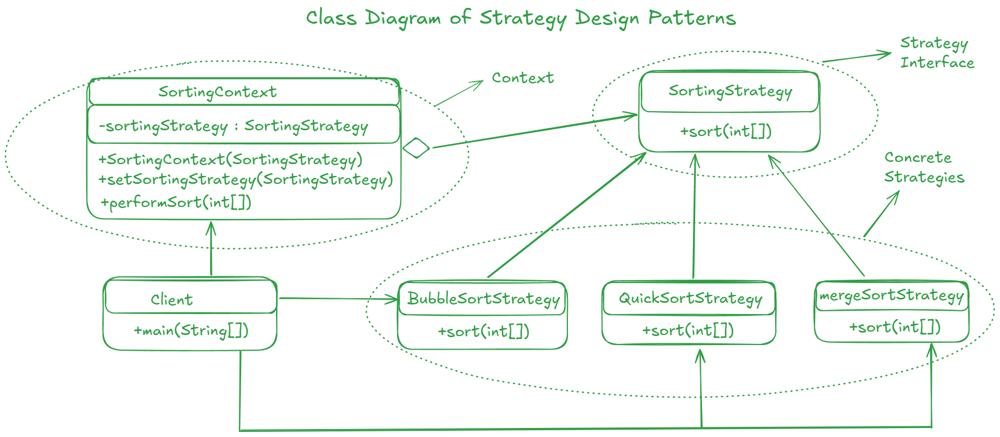
Complete Code of the above example :
1.) Context(SortingContext) :
public class SortingContext {
	private SortingStrategy sortingStrategy;

	public SortingContext(SortingStrategy sortingStrategy) {
		this.sortingStrategy = sortingStrategy;
	}

	public void setSortingStrategy(SortingStrategy sortingStrategy) {
		this.sortingStrategy = sortingStrategy;
	}

	public void performSort(int[] array) {
		sortingStrategy.sort(array);
	}
}
2.) Strategy Interface(SortingStrategy) :
public interface SortingStrategy {
	void sort(int[] array);
}
3.) Concrete Strategies :
// BubbleSortStrategy
public class BubbleSortStrategy implements SortingStrategy {
	@Override
	public void sort(int[] array) {
		// Implement Bubble Sort algorithm
		System.out.println("Sorting using Bubble Sort");
	}
}

// MergeSortStrategy
public class MergeSortStrategy implements SortingStrategy {
	@Override
	public void sort(int[] array) {
		// Implement Merge Sort algorithm
		System.out.println("Sorting using Merge Sort");
	}
}

// QuickSortStrategy
public class QuickSortStrategy implements SortingStrategy {
	@Override
	public void sort(int[] array) {
		// Implement Quick Sort algorithm
		System.out.println("Sorting using Quick Sort");
	}
}
4.) Client Component :
public class Client {
	public static void main(String[] args) {
		// Create SortingContext with BubbleSortStrategy
		SortingContext sortingContext = new SortingContext(new BubbleSortStrategy());
		int[] array1 = {5, 2, 9, 1, 5};
		sortingContext.performSort(array1); // Output: Sorting using Bubble Sort

		// Change strategy to MergeSortStrategy
		sortingContext.setSortingStrategy(new MergeSortStrategy());
		int[] array2 = {8, 3, 7, 4, 2};
		sortingContext.performSort(array2); // Output: Sorting using Merge Sort

		// Change strategy to QuickSortStrategy
		sortingContext.setSortingStrategy(new QuickSortStrategy());
		int[] array3 = {6, 1, 3, 9, 5};
		sortingContext.performSort(array3); // Output: Sorting using Quick Sort
	}
}
5.) Output :
Sorting using Bubble Sort
Sorting using Merge Sort
Sorting using Quick Sort
Benefits of the Strategy Design Pattern :
- Eliminates Conditional Statements : Instead of using complex if-else or switch conditions, different strategies can be encapsulated in classes.
- Open/Closed Principle : New strategies can be added without modifying existing code.
- Promotes Reusability : Strategies are reusable across different contexts.
- Flexible and Extensible : The system can dynamically switch between algorithms at runtime.
Drawbacks of The Strategy Design Principle :
- Increased Complexity : Adding multiple strategy classes can increase the number of classes, which may make the system harder to maintain.
- Client Awareness : The client needs to know about the different strategies and decide which one to use.
- Overhead : Context switching between strategies may introduce slight overhead in performance.