


Hello there,
I planned to post series of posts that might help to prepare for android/mobile system design interviews.
Part- 1 YOUR ARE READING
Part- 2 https://leetcode.com/discuss/interview-question/system-design/722108/Android-Mobile-System-Design-(May-be-useful-for-iOS)-Part-2
Live Location Sharing with Server
Everyone should be familier with this, but there is lot more details to understand every single module.
Requirements:
- Share live location to the server
- Threshold 2min / 100 mtr
- Airplane Mode
- Also update location when app is in background
- Google PlayServices / Location Provider?
- Offilne support required
Now, take a look at the image below.
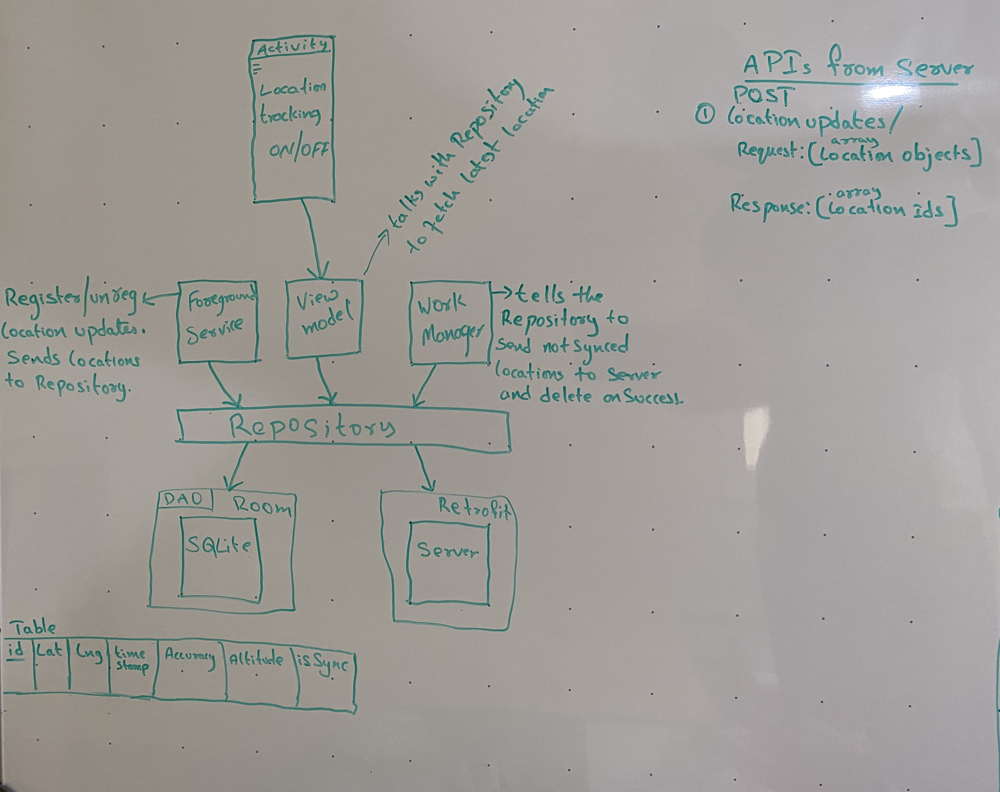
Approach:
Each point below is correspondent to the Requirements above.
- I can adjust the parameters while registering for location updates with the framework API.
- We might get location updates while mobile in the airplane mode, I will consider the altitude, accuracy, mode of the source to filter out odd location updates.
- I will use Foreground service(background service is different) by notifying the user with a sticky notification. This service to receive location updates when app is not in use.
- Not all phones have Google PlayServices. So I will choose framework's LocationManager/Provider to register/unregister for continuous location updates.
- I will save all the locations to the SQLite databse locally. And run a repeated WorkManager task to push the data to server.
Required
From Mobile Side
SQLite
WorkManager
Retrofit
MVVM architecture
LiveData
DataBinding
Foreground Service
Activity (Turn ON/OFF location tracking)
SharedPreferences
Complete appplication talks in terms of below model.
/**
 * Android gives us this https://developer.android.com/reference/android/location/Location
 * object when there is a location update.
 * We take the required fields and build our model object as below.
 * /
class Location {
	int id; // SQLite primary key autogenerated
	double latitude;
	double longitude;
	long timestamp; //  milliseconds android's  Location object contains the time.
	float accuracy;
	double altitude;

	// ignored getter and setter for simplicity
}
From Server Side
Server has to expose an API that accepts Location objects (see model below) and returns successful location ids as an array that server has received. We will mark them as synced in the SQLite. Next time we send that are not synced.
Note we can extend this app to get the friend's live location.
I will be happy to answer all your questions on this.