


Ever struggled with sharing a link so long that takes up the entire message? URL shorteners like TinyURL come to the rescue, transforming lengthy web addresses into compact, readable link, making it cleaner and shareable — especially on platforms where every character counts.

But how does it work?
This article will demystify URL Shorteners, explaining their working and architecture. Whether you're simply curious or planning to build one, this guide will break it down for you.
Let’s think about what you’d expect from a great URL shortener
Functional Requirements:
- Shorten Links: "Can it turn a long, messy link into something neat and tiny? Absolutely—it’s the core feature!"
- Redirect Seamlessly: "Click the short link, and you’re taken to the original URL without a hitch."
- Custom Links? Why Not!: "Want your brand or name in the URL? Let you create custom aliases like tinyurl.com/NameOfYourChoice."
- Set Expiry Dates: "Need a link that stops working after a certain time? Expiry options make that easy."
Non-Functional Requirements:
- High Availability: The system should be available 24/7 with minimal downtime.
- Low Latency: No one likes waiting. Shortening a link or redirecting to the original should feel instant.
- Scalability: Whether it’s 10 users or 10 million, a good shortener scales effortlessly to handle high traffic.
- Fault Tolerance: Ensure the system remains operational despite server failures.
- Reliable Storage: Once a link is created, it shouldn’t disappear. Data durability keeps your links and stats intact.
- Security: Prevent abuse like generating spam URLs or unauthorized URL access.
API DESIGN
1. Shorten URL
- Endpoint: POST /shorten
- Request
{
  "longUrl": "https://example.com/very-long-url",
  "customAlias": "custom123", // Optional
  "expiryDate": "2024-12-31T23:59:59Z" // Optional
}- Response
{
  "shortUrl": "https://tiny.url/custom123"
}
2. Redirect to Original URL
- Endpoint: GET /{shortUrl}
- Response: Redirects to the original URL.
3. Get Analytics
- Endpoint: GET /analytics/{shortUrl}
- Response:
{
  "shortUrl": "https://tiny.url/custom123",
  "longUrl": "https://example.com/very-long-url",
  "clickCount": 12345,
  "createdAt": "2024-01-01T00:00:00Z"
}
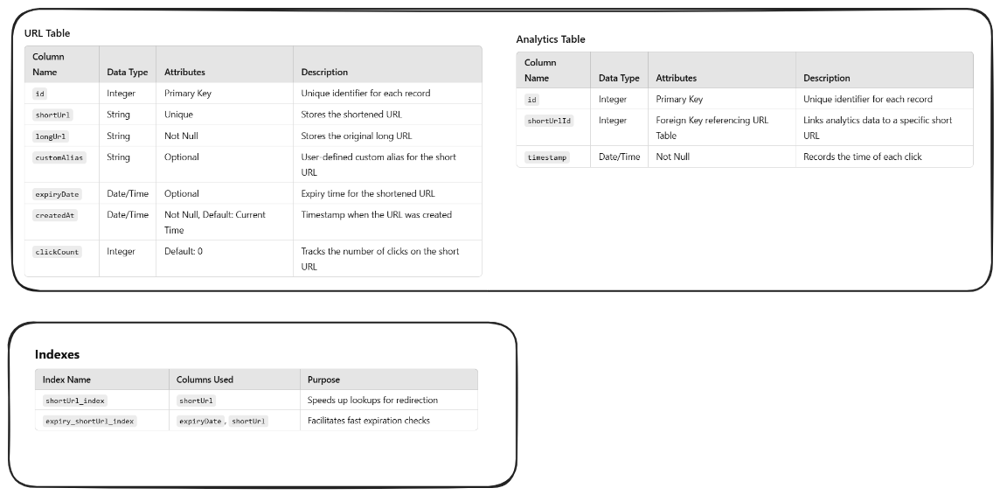
Database Schema
High-Level Design (HLD)
The Core Components
- Frontend
- Lets users paste long URLs, request custom aliases
- Communicates with the backend through APIs and can provide handy features like real-time preview, copy button.
- Backend
- Handles URL shortening, custom alias validation, redirects
- Generates short keys using techniques like hashing, encoding, unique id generation etc
- Database
- Stores the mappings between short and long URLs, plus metadata like creation time, expiry, and click counts.
- Design tweak: Use a relational database for structured data, with NoSQL support for massive analytics scalability.
- Cache
- Caches frequently accessed short URLs to minimize database queries.
- Bonus: Adds a TTL (time-to-live) for cache entries to ensure updates stay fresh.
- Load Balancer
- Distributes incoming traffic across multiple servers for smooth operation.
- Backup plan: Reroutes traffic automatically if a server fails, ensuring high availability.
How It All Comes Together
- A user submits a long URL via the frontend.
- The backend generates a unique short URL and saves it to the database.
- Popular URLs are cached for faster redirection.
- When the short URL is accessed, the system redirects the user to the original link and logs analytics data.
Deep Dive into High-Level Design (HLD)
Let’s roll to the mechanics of a URL shortener.
URL Shortening Process
1. Input Validation: The First Line of Defense
Before anything, validate the input to ensure it's a legitimate URL and ready for transformation. This involves:
- Format Check: Is the input a valid URL structure? For instance, https://example.com is valid, but ht!p://bad-url is not.
- Duplicate Check: If the long URL already exists in our database, we simply return its existing short URL, avoiding redundant entries.
- Blacklist Check: Does the URL belong to a known malicious domain? If yes, we block it. (An updated table of blacklisted domains could be kept provided by blacklist providers like Google Safe Browsing or external services could be subscribed that provide real-time threat detection for URLs)
2. The Core Logic : Exploring Techniques for Unique Short URL Generation
- Hashing the URL
-
This technique directly hashes the long URL using a hashing algorithm which converts the input string into 32-char/64-char hexadecimal value.
-
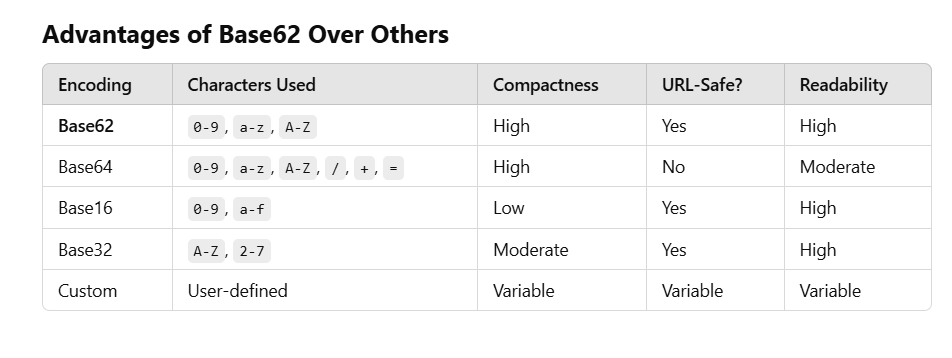
Since the hash result won't be human-readable and too long for "short" URL, encoding comes to the picture (that too Base62 encoding : uses only 6 char of the hash and converts it to an alphanumeric string 0-9 digits, lower and uppercase eng alphabets)
eg. Input: https://example.com/very/long/url/with/multiple/segments Hashed Value: 33b6758ee9b0c5be8f4a9a123c9a3e7813cb5875ad24b3e438c98db8f7b3c4d7 Base62 Encode: 6Ahiy Short URL: https://tiny.url/6Ahiy -
Downsides
-- Risk of collisions if the hash is truncated too much.
-- Requires handling collision scenarios, adding complexity.
- Random IDs + Base62
-
This technique generates a random alphanumeric string for each URL, ensuring uniqueness
-
How it works
- A random generator picks characters from a Base62 character set.
- The generated string is stored in the database along with the original URL.
- Collisions (rarely) are handled by regenerating the string if it already exists.
eg. Input: https://example.com/long/url Random String: aB3xY2 Short URL: https://tiny.url/aB3xY2 -
Downsides
- Requires a database lookup to check for collisions, adding overhead.
- Random keys tend to be longer for ensuring uniqueness, which could impact URL length.
- Sequential IDs + Base62
-
This approach uses an auto-incremented ID for every new URL
-
Converts it into a Base62 string
eg. Input: Three long URLs: https://example.com/first https://example.com/second https://example.com/third Process: Assign IDs: 1, 2, 3. Convert IDs to Base62: ID 1 → Base62: 1 ID 2 → Base62: 2 ID 3 → Base62: 3 Construct short URLs: https://tiny.url/1 https://tiny.url/2 https://tiny.url/3 Output: Short URLs: https://tiny.url/1, https://tiny.url/2, https://tiny.url/3 -
Downsides
-- IDs are predictable, which might let someone guess the next URL.
-- It’s not ideal for distributed systems where multiple servers handle requests.
- Hybrid Approach: Sequential IDs with Hashing
Combining sequential IDs with hashing
-
eg.
Input:https://example.com/secure/url
Process-
Assign Sequential ID:
123 -
Apply Hashing:
- Hash(123 + Salt):
f1a2c3 - Salt is a random value added to the input before hashing to ensure uniqueness and prevent predictability, making the output more secure.
- Hash(123 + Salt):
-
Encode in Base62:
- Base62(f1a2c3):
6Ahiy
- Base62(f1a2c3):
Output:
https://tiny.url/6Ahiy -
-
Downsides
-- Slightly more computational overhead for hashing.
-- Salt must be carefully managed to maintain consistency.
-
Sharded Key Generation
When a system grows large and distributed (like handling millions of URLs across multiple servers), generating unique IDs becomes a challenge. A single database can't handle all the traffic efficiently.
Sharded key generation solves this by decentralizing the process : Each server or "shard" is responsible for generating unique keys independently
Popular techniques- Snowflake IDs:
Combines:
Timestamp: For ordering.
Machine ID: To identify the shard/server.
Sequence Number: To ensure uniqueness within the shard.
The result is a 64-bit unique ID, which can be encoded in Base62 for compactness.
eg. Input: https://example.com/scalable/url Process: Timestamp: 20240101 Shard ID: 01 Sequence: 0001 // combine all three Snowflake ID: 20240101010001 Base62(20240101010001): aB3xY2 Output: Short URL: https://tiny.url/aB3xY2- UUIDs (Universally Unique Identifiers):
Generates a 128-bit ID using randomness and system-specific data (e.g., MAC address).
Provides global uniqueness but creates longer IDs, which aren’t ideal for short URLs.
- Snowflake IDs:
- Downsides
-- Snowflake and UUIDs produce longer keys, which might not be ideal for "short" URLs.
-- The setup is more complex than simpler approaches like sequential or random IDs.