TRY PRACTICING THESE PROBLEMS ON CONCURRENCY FROM [LEETCODE] : (https://leetcode.com/problemset/concurrency/) : 9/30/24
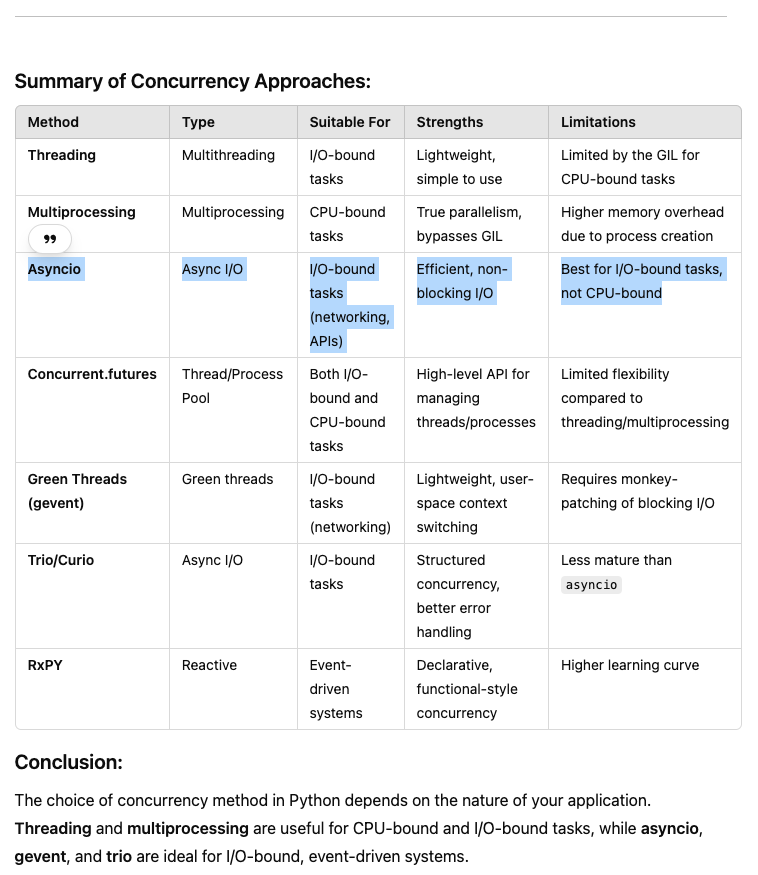
Python offers several ways to achieve concurrency, allowing programs to perform multiple tasks at the same time or to handle large-scale I/O efficiently. Here are the main approaches:
- Threading
Overview: Python's threading module allows multiple threads to run concurrently within the same process. This is useful for I/O-bound tasks like network communication, file I/O, or interacting with APIs.
Limitations: Due to Python’s Global Interpreter Lock (GIL), CPU-bound tasks won’t benefit much from threading because the GIL only allows one thread to execute Python bytecode at a time.
import threading
import time

def task(name):
    print(f"{name} started")
    time.sleep(2)
    print(f"{name} finished")

# Create threads
thread1 = threading.Thread(target=task, args=("Task 1",))
thread2 = threading.Thread(target=task, args=("Task 2",))

# Start threads
thread1.start()
thread2.start()

# Wait for both threads to complete
thread1.join()
thread2.join()

print("All tasks completed")
- Multiprocessing
Overview: The multiprocessing module enables true parallelism by creating multiple processes, each with its own Python interpreter and memory space. It bypasses the GIL, making it ideal for CPU-bound tasks like data processing, scientific computations, etc.
Benefit: Since each process runs independently, the GIL does not interfere, and processes can run on multiple cores. Example:
import multiprocessing
import time

def task(name):
    print(f"{name} started")
    time.sleep(2)
    print(f"{name} finished")

# Create processes
process1 = multiprocessing.Process(target=task, args=("Process 1",))
process2 = multiprocessing.Process(target=task, args=("Process 2",))

# Start processes
process1.start()
process2.start()

# Wait for both processes to complete
process1.join()
process2.join()

print("All tasks completed")
- Asyncio (Asynchronous I/O)
Overview: The asyncio module provides a way to write asynchronous, non-blocking code using coroutines. It's designed for I/O-bound tasks (e.g., networking, file I/O) that spend most of their time waiting for I/O operations to complete, allowing other tasks to run concurrently.
Benefits: Asyncio achieves concurrency without the need for threads or processes. It uses a single-threaded event loop that schedules tasks, making it lightweight for I/O-bound tasks.
Example:
import asyncio

async def task(name):
    print(f"{name} started")
    await asyncio.sleep(2)
    print(f"{name} finished")

# Event loop
async def main():
    await asyncio.gather(task("Task 1"), task("Task 2"))

# Run the event loop
asyncio.run(main())
- Concurrent.futures
Overview: The concurrent.futures module provides a high-level API for running tasks concurrently. It offers two primary abstractions:
ThreadPoolExecutor: Executes tasks using threads (for I/O-bound tasks).
ProcessPoolExecutor: Executes tasks using processes (for CPU-bound tasks).
Benefits: Simplifies the use of both threading and multiprocessing, automatically managing pools of threads or processes.
Example using ThreadPoolExecutor:
from concurrent.futures import ThreadPoolExecutor
import time

def task(name):
def task(name):
    print(f"{name} started")
    time.sleep(2)
    print(f"{name} finished")

# Use ThreadPoolExecutor to manage threads
with ThreadPoolExecutor(max_workers=2) as executor:
    executor.submit(task, "Task 1")
    executor.submit(task, "Task 2")

print("All tasks submitted")
Example using ProcessPoolExecutor:
from concurrent.futures import ProcessPoolExecutor
import time

def task(name):
    print(f"{name} started")
    time.sleep(2)
    print(f"{name} finished")

# Use ProcessPoolExecutor to manage processes
with ProcessPoolExecutor(max_workers=2) as executor:
    executor.submit(task, "Task 1")
    executor.submit(task, "Task 2")

print("All tasks submitted")
- Green Threads with gevent or eventlet
Overview: Green threads are user-space threads that simulate multithreading but run within a single OS thread. Libraries like gevent and eventlet provide green thread functionality and are useful for I/O-bound tasks like networking.
Benefits: More lightweight than system threads, as they are managed in user space and do not involve OS-level context switching.
Example with gevent:
import gevent
from gevent import monkey
import time

# Patch I/O to be non-blocking
monkey.patch_all()

def task(name):
    print(f"{name} started")
    time.sleep(2)  # This is non-blocking due to gevent
    print(f"{name} finished")

# Start green threads (gevents)
gevent.joinall([
    gevent.spawn(task, "Task 1"),
    gevent.spawn(task, "Task 2")
])
- Coroutines with trio or curio
Overview: trio and curio are libraries built to provide structured concurrency using Python’s native async/await syntax. They provide more structured, simpler ways to manage async tasks, handling task cancellation, exceptions, and cleanup more gracefully than asyncio.
Example with trio:
import trio

async def task(name):
    print(f"{name} started")
    await trio.sleep(2)
    print(f"{name} finished")

async def main():
    async with trio.open_nursery() as nursery:
        nursery.start_soon(task, "Task 1")
        nursery.start_soon(task, "Task 2")

trio.run(main)
We use asyncio for concurrency in python code at Rainberry.
- Asynchronous programming allows a single thread to handle multiple I/O-bound operations, which can improve the scalability of a program
- async version allows for more efficient concurrency handling without the need for multi-threading, making it more scalable for IO-bound tasks like this.
- Asynchronous programming is perfect for highly concurrent I/O-bound tasks, but it may be difficult to predict the order in which tasks will be executed.
Should I use asyncio or threading?
Threading is ideal for I/O-bound tasks and data sharing between threads. Multiprocessing is best suited for CPU-bound tasks and taking advantage of multiple CPU cores. Asynchronous programming is perfect for highly concurrent I/O-bound tasks, but it may be difficult to predict the order in which tasks will be executed.
we can see that multithreading programming is all about concurrent execution of different functions. Async programming is about non-blocking execution between functions
https://discuss.python.org/t/what-are-the-advantages-of-asyncio-over-threads/2112
https://www.toptal.com/python/beginners-guide-to-concurrency-and-parallelism-in-python
Before python 3.6 version:
loop = asyncio.get_event_loop()
...
task = asyncio.ensure_future(update_account_pub_key(stub))         # create async task. Similar to spawning new thread
tasks.append(task)
...
loop.run_until_complete(asyncio.wait(tasks))
Using asyncio with run_in_executor (instead of threading) to allow you to perform tasks concurrently,
async def averify(self, address, signature, data):
        loop = asyncio.get_event_loop()
        if await loop.run_in_executor(None, self.verify, address, signature, data) == True:
            return True
Using asyncio with run_in_executor and using the threading module both allow you to perform tasks concurrently, but they operate in different ways and are designed for different use cases. Here's a detailed comparison of the two approaches:
Concurrency Model
------------------

- Asyncio (run_in_executor):

* Designed for asynchronous I/O-bound tasks (e.g., file I/O, network requests, etc.).
* Only one thread is running event loop, but many tasks can be awaiting I/O. When task is waiting (like network I/O), another task can run.
* For CPU-bound tasks, you can offload them using run_in_executor() to avoid blocking the event loop.
* More predictable and efficient for I/O-heavy applications.

- Threading:

* Threads can handle both I/O-bound and CPU-bound tasks.
* Multiple threads are used in parallel, and each can run CPU-intensive operations. However, due to Python's Global Interpreter Lock (GIL),
only one thread can execute Python bytecode at a time. This means threading is less efficient for CPU-bound tasks but still useful for
I/O-bound tasks.
Note: uvloop is ultra fast asyncio event loop (uvloop makes asyncio 2-4x faster).
What does async and await do in Python?
An async function uses the await keyword to denote a coroutine. When using the await keyword, coroutines release the flow of control back to the event loop. To run a coroutine, we need to schedule it on the event loop. After scheduling, coroutines are wrapped in Tasks as a Future object.
Example of async/await with exception handling
aync/await - The async keyword is used to create a Python coroutine. The await keyword suspends execution of a coroutine until it completes and returns the result data.
    async def create_account(self, key, client_version_number=None):
        result = Data()
        result.payer_address = key
        if not self.db: self.db = await get_db()
        try:
            loop = asyncio.get_event_loop()
            account_uuid = await loop.run_in_executor(None, self.util.get_account_uuid, key)
            public_address = await loop.run_in_executor(None, self.util.get_public_address, key)
            account = await self.db.create_account(account_uuid, key, public_address, client_version_number)

            if account == DB_ERROR:
                result.server_status = Status.UNAVAILABLE
                result.status_message = 'Cannot connect to database'
                logger.exception('DB_ERROR: Database connection/query error')
                return result
            elif account == DEADLINE_EXCEEDED:
                result.server_status = Status.DEADLINE_EXCEEDED
                result.status_message = 'Database connection timed out'
                logger.exception('DEADLINE_EXCEEDED: Database connection timed out')
                return result
            elif account == ERR_UNKNOWN:
                result.server_status = Status.UNKNOWN
                logger.exception('create_account')
                return result

            result.payer_balance = account[1]
            result.server_status = Status.OK
            if account[2] == CANCELLED:
                result.server_status = Status.CANCELLED
                logger.error('CANCELLED: Request was cancelled')
            return result
        except Exception:
            result.server_status = Status.UNKNOWN
            if sys.exc_info()[0] == futures.CancelledError:
                result.server_status = Status.CANCELLED
            logger.exception('create_account exception')
return resultThis code demonstrates how to manage multiple asynchronous tasks using asyncio, from creating and managing tasks with ensure_future() to running them in the event loop.
import asyncio

# Mock async function to simulate updating an account's public key
async def update_account_pub_key(stub):
    print(f"Updating public key for {stub}...")
    await asyncio.sleep(2)  # Simulate network operation or IO-bound task
    print(f"Public key updated for {stub}")
    return f"PubKey-{stub}"

# Main logic to create tasks and run the event loop
def main():
    # Example stubs representing user accounts
    stubs = ["account1", "account2", "account3"]

    # Create the event loop
    loop = asyncio.get_event_loop()         # <---------------

    tasks = []

    # Create and append tasks using asyncio.ensure_future
    for stub in stubs:
        task = asyncio.ensure_future(update_account_pub_key(stub))  # Schedule the task  <---------------
        tasks.append(task)  # Add the task to the list

    # Run the event loop until all tasks are completed
    loop.run_until_complete(asyncio.wait(tasks))            # <---------------

    # Optionally, close the event loop if you won't reuse it
    loop.close()   # <---------------

# Run the main function
if __name__ == "__main__":
    main()
Output:
Updating public key for account1...
Updating public key for account2...
Updating public key for account3...
Public key updated for account1
Public key updated for account2
Public key updated for account3
Key Concepts Explained:
++++++++++++++++++++++
-
Before Python3.6 :
- loop = asyncio.get_event_loop(): This creates or gets the current event loop where the asynchronous tasks will be scheduled.
- tasks = asyncio.ensure_future(print(foo)): This schedules the coroutine update_account_pub_key(stub) for execution in the event loop, returning an asyncio.Task object.
- loop.run_until_complete(asyncio.wait(tasks)): This starts the event loop and runs it until all the tasks in the tasks list are completed. Here asyncio.wait(tasks): Waits for all the tasks in the tasks list to finish execution.
- loop.close()
-
After Python 3.6:
asyncio.run() is the preferred way to run asynchronous programs, which is why we are not using asyncio.get_event_loop() explicitly. Using asyncio.get_event_loop() was more common in Python 3.6 and earlier, where you needed to manually retrieve and manage the event loop. This involves handling:
- Creating the loop.
- Ensuring the loop runs properly with loop.run_until_complete().
- Closing the loop manually to release resources with loop.close().
With asyncio.run(), all of this happens automatically, making the code cleaner and easier to maintain.
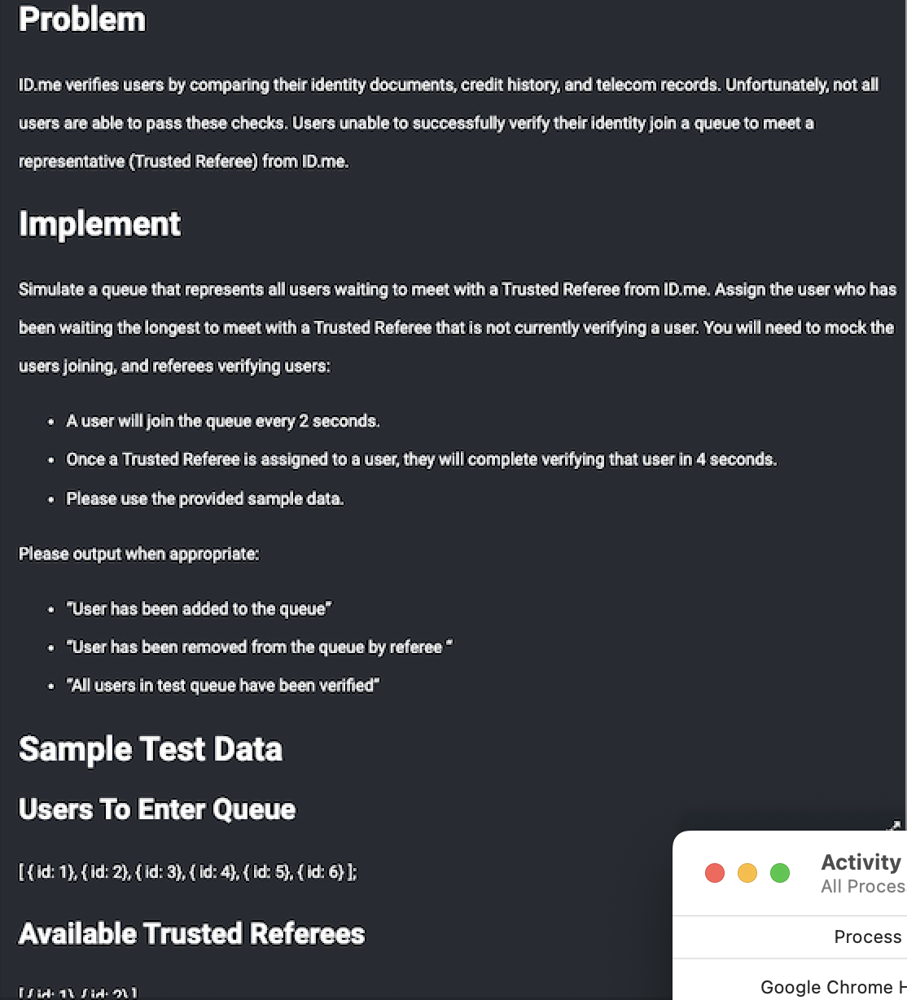
Interview Question using both asyncio and threading : (ID.me)
Write a Python code that simulates a queue and verification process, where users are added to the queue every 2 seconds and referees verify users every 4 seconds. The code should use threading to ensure concurrent execution of these operations.
Solution-1: Using threading :
This code uses threading to simulate a multi-threaded queue system where users are being enqueued and serviced by referees. Here's a breakdown of how the threading concepts are applied:
Key Threading Concepts:
Threading Basics:
- threading.Thread(target=..., args=...): This creates a new thread that will run the specified target function (enqueue_users or service_users) concurrently. The function arguments are passed through args=....
- thread.start(): This starts the execution of the thread. The thread will run the target function in parallel with other threads.
- thread.join(): This ensures the main program waits for the thread to finish before proceeding. Without join(), the program may exit before the threads finish their tasks.
import threading
import time
import datetime

class User:
    def __init__(self, id):
        self.id = id

class TrustedReferee:
    def __init__(self):
        self.is_busy = False

def enqueue_users(users_to_enter, queue):
    while users_to_enter:
        user = User(users_to_enter.pop(0))

        formatted_time = datetime.datetime.now().strftime('%Y-%m-%d %H:%M:%S.%f')
        print("User has been ADDED to the queue                         ", formatted_time[:-3])
        queue.append(user)
        time.sleep(2)

def service_users(available_referees, queue):
    while True:
        for referee in available_referees:
            if not referee.is_busy and queue:
                referee.is_busy = True
                user_to_verify = queue.pop(0)

                formatted_time = datetime.datetime.now().strftime('%Y-%m-%d %H:%M:%S.%f')
                print("User has been removed from queue", formatted_time[:-3])

                time.sleep(4)  # Simulate verification taking 4 seconds
                referee.is_busy = False

def simulate_queue():
    users_to_enter = [{'id': 1}, {'id': 2}, {'id': 3}, {'id': 4}, {'id': 5}, {'id': 6}]
    available_referees = [TrustedReferee() for _ in range(2)]  # Adjust number of referees as needed
    queue = []

    # Create threads for enqueue and service operations
    enqueue_thread = threading.Thread(target=enqueue_users, args=(users_to_enter, queue))
    service_thread = threading.Thread(target=service_users, args=(available_referees, queue))

    # Start the threads
    enqueue_thread.start()
    service_thread.start()

    # Wait for the threads to finish
    enqueue_thread.join()
    service_thread.join()

    print("All users in test queue have been verified")

if __name__ == '__main__':
    simulate_queue()
Output:
User has been ADDED to the queue                          2024-09-24 22:57:28.219
User has been removed from queue 2024-09-24 22:57:28.222
User has been ADDED to the queue                          2024-09-24 22:57:30.222
User has been ADDED to the queue                          2024-09-24 22:57:32.226
User has been removed from queue 2024-09-24 22:57:32.230
User has been ADDED to the queue                          2024-09-24 22:57:34.228
User has been ADDED to the queue                          2024-09-24 22:57:36.234
User has been removed from queue 2024-09-24 22:57:36.237
User has been ADDED to the queue                          2024-09-24 22:57:38.238
User has been removed from queue 2024-09-24 22:57:40.241
User has been removed from queue 2024-09-24 22:57:44.242
User has been removed from queue 2024-09-24 22:57:48.246
Session Killed due to Timeout.
Press Enter to exit terminal
Threading Concepts in Detail:
-
Concurrency:
The key concept here is that the two tasks (enqueue_users and service_users) run concurrently. Thread 1 (enqueue_thread) keeps adding users to the queue, while Thread 2 (service_thread) removes and processes users from the queue simultaneously. -
Shared Resources:
Both threads are accessing the same shared resource, the queue. Thread 1 adds users to the queue, and Thread 2 removes users from it. This can introduce race conditions if both threads access the queue at the same time without proper synchronization (e.g., using a thread-safe data structure like queue.Queue or a Lock). -
Time Simulation:
time.sleep(2) and time.sleep(4) simulate the time it takes for users to enter the queue and for referees to process them. This slows down execution, giving the threads time to interact with the queue. -
Thread Lifecycle:
start() launches the thread, and join() makes sure the main thread waits for both worker threads to complete their tasks before continuing. Without join(), the main program might terminate before the threads finish processing users.
Potential Issues:
- Race Conditions: Since both threads access the same queue without locking or thread-safe mechanisms, there is a risk that one thread might try to pop from the queue while another is adding to it. This could cause unpredictable behavior or errors.
- Busy-Waiting: The service_users() function uses an infinite while loop without any break condition or sleep, which can cause the thread to use CPU unnecessarily when there are no users to service. A better approach would be to use condition variables or signals to avoid this.
Conclusion:
This code uses multithreading to simulate two concurrent tasks (user enqueueing and referee servicing). While the threading model allows the two tasks to run in parallel, it introduces potential risks like race conditions when accessing shared data (the queue), which would need to be addressed in a more complex or real-world scenario by using thread-safe techniques or data structures.
Solution-2: Using asyncio
Key Changes:
-
Replaced threading.Thread with asyncio.ensure_future():
We create asynchronous tasks using asyncio.ensure_future() instead of spawning threads. This schedules the functions in the event loop. -
Replaced time.sleep() with await asyncio.sleep():
asyncio.sleep() allows the event loop to continue executing other tasks during the sleep period, whereas time.sleep() would block the entire thread. -
Changed synchronous functions to async:
Both enqueue_users() and service_users() are now asynchronous, allowing for concurrent task scheduling. -
Added await asyncio.sleep(1) inside service_users():
This prevents the loop from continuously running without pause when no referees are available or no users are in the queue. -
Used asyncio.run() to start the event loop:
This replaces threading.Thread and join(). asyncio.run() initializes and runs the event loop until all scheduled tasks are completed.
import asyncio
import datetime

class User:
    def __init__(self, id):
        self.id = id

class TrustedReferee:
    def __init__(self):
        self.is_busy = False

# Async function to enqueue users
async def enqueue_users(users_to_enter, queue):
    while users_to_enter:
        user = User(users_to_enter.pop(0))

        formatted_time = datetime.datetime.now().strftime('%Y-%m-%d %H:%M:%S.%f')
        print("User has been ADDED to the queue                         ", formatted_time[:-3])
        queue.append(user)
        await asyncio.sleep(2)  # Asynchronous sleep to simulate time delay

# Async function to service users by referees
async def service_users(available_referees, queue):
    while True:
        for referee in available_referees:
            if not referee.is_busy and queue:
                referee.is_busy = True
                user_to_verify = queue.pop(0)

                formatted_time = datetime.datetime.now().strftime('%Y-%m-%d %H:%M:%S.%f')
                print("User has been removed from queue", formatted_time[:-3])

                await asyncio.sleep(4)  # Asynchronous sleep to simulate verification time
                referee.is_busy = False
        await asyncio.sleep(1)  # Small delay to avoid tight-loop polling

# Main function to simulate the queue and referees
async def simulate_queue():
    users_to_enter = [{'id': 1}, {'id': 2}, {'id': 3}, {'id': 4}, {'id': 5}, {'id': 6}]
    available_referees = [TrustedReferee() for _ in range(2)]  # Two referees
    queue = []

    # Create tasks for enqueueing users and servicing them by referees
    enqueue_task = asyncio.ensure_future(enqueue_users(users_to_enter, queue))
    service_task = asyncio.ensure_future(service_users(available_referees, queue))

    # Wait for the enqueueing to finish
    await enqueue_task

    # Allow the service task to run for a bit after all users are enqueued
    await asyncio.sleep(10)  # Adjust timing as needed to ensure all users are serviced

    # Cancel the service task after all users are serviced
    service_task.cancel()

    print("All users in test queue have been verified")

# Entry point to run the asyncio event loop
if __name__ == '__main__':
    asyncio.run(simulate_queue())


---------------

NOTE: asyncio.run() is the preferred way to run asynchronous programs,
which is why we are not using asyncio.get_event_loop() explicitly.

Using asyncio.get_event_loop() was more common in Python 3.6 and earlier, where you needed to manually retrieve
and manage the event loop. This involves handling:

* Creating the loop.
* Ensuring the loop runs properly with loop.run_until_complete().
* Closing the loop manually to release resources with loop.close().

With asyncio.run(), all of this happens automatically, making the code cleaner and easier to maintain.
Output :
User has been ADDED to the queue                          2024-09-25 04:57:22.195
User has been removed from queue 2024-09-25 04:57:22.195
User has been ADDED to the queue                          2024-09-25 04:57:24.197
User has been removed from queue 2024-09-25 04:57:26.198
User has been ADDED to the queue                          2024-09-25 04:57:26.199
User has been ADDED to the queue                          2024-09-25 04:57:28.201
User has been ADDED to the queue                          2024-09-25 04:57:30.201
User has been removed from queue 2024-09-25 04:57:31.203
User has been ADDED to the queue                          2024-09-25 04:57:32.203
User has been removed from queue 2024-09-25 04:57:35.204
User has been removed from queue 2024-09-25 04:57:40.210
All users in test queue have been verified


** Process exited - Return Code: 0 **
Press Enter to exit terminal
Conclusion :
This async version allows for more efficient concurrency handling without the need for multi-threading, making it more scalable for IO-bound tasks like this.
HANDLING RACE CONDITIONS
Detailed Differences
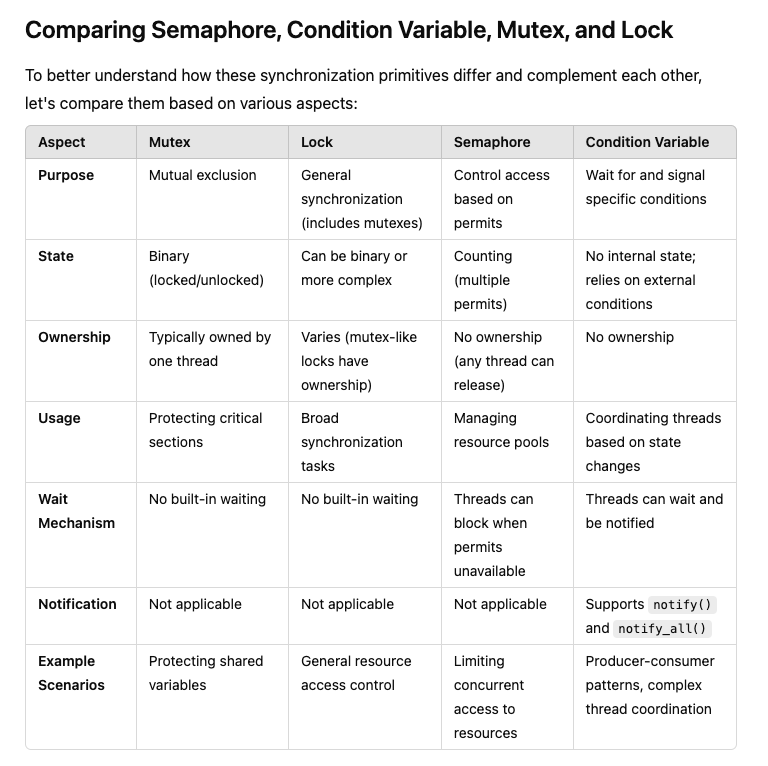
Mutex vs. Lock
Mutex is a specific type of lock focused on mutual exclusion. In many programming contexts, especially in languages like Python, the terms "mutex" and "lock" are used interchangeably.
Lock can refer to a broader category, including mutexes and other specialized locks like read-write locks.
Semaphore vs. Mutex/Lock
Mutexes/Locks are primarily for ensuring that only one thread accesses a resource at a time.
Semaphores can allow multiple threads to access a limited number of resources concurrently. They maintain a count of available permits, making them suitable for controlling access to a pool of resources.
Condition Variable vs. Others
Condition Variables are not used for mutual exclusion or resource counting. Instead, they allow threads to wait for specific conditions or state changes before proceeding.
They are typically used alongside mutexes or locks to protect shared state that threads are waiting on.
Ownership and Flexibility
Mutexes have ownership semantics, meaning the thread that locks the mutex should be the one to unlock it.
Semaphores do not have ownership, allowing any thread to release a semaphore regardless of which thread acquired it.
Detailed Comparision :
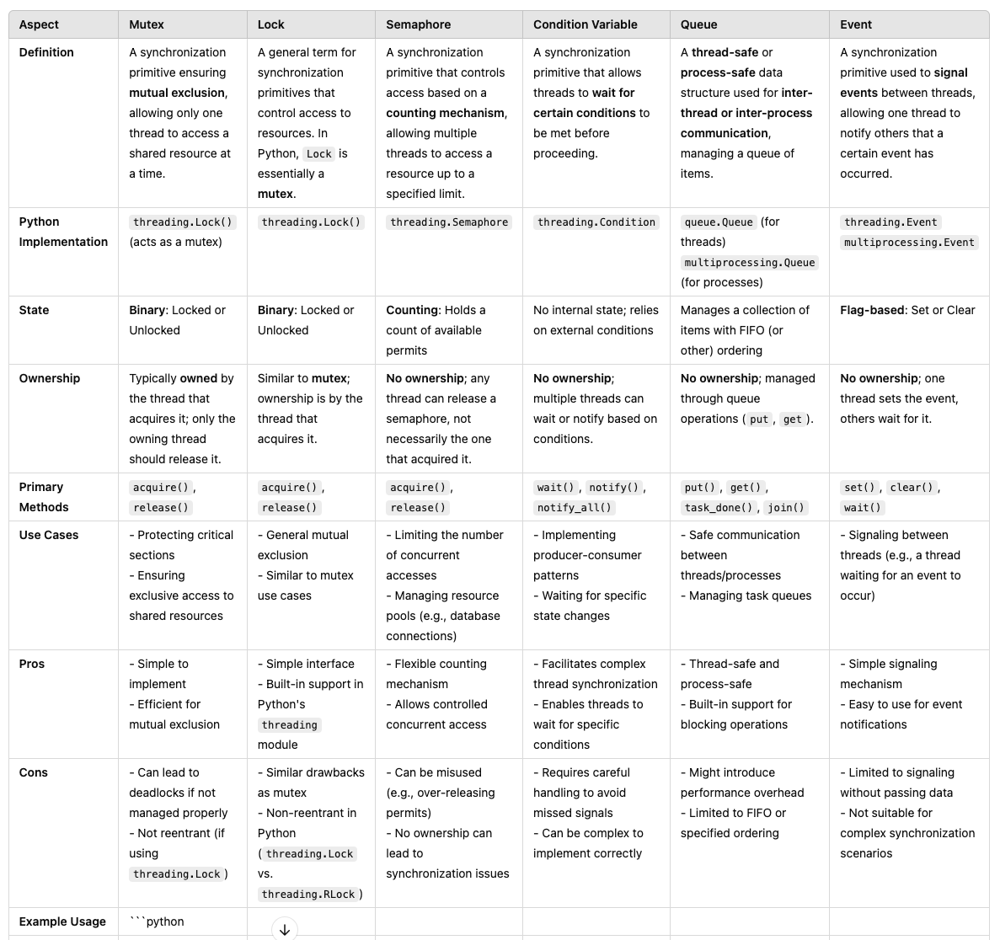
Race conditions and synchronization issues occur when multiple threads or tasks concurrently access and modify shared resources without proper coordination.
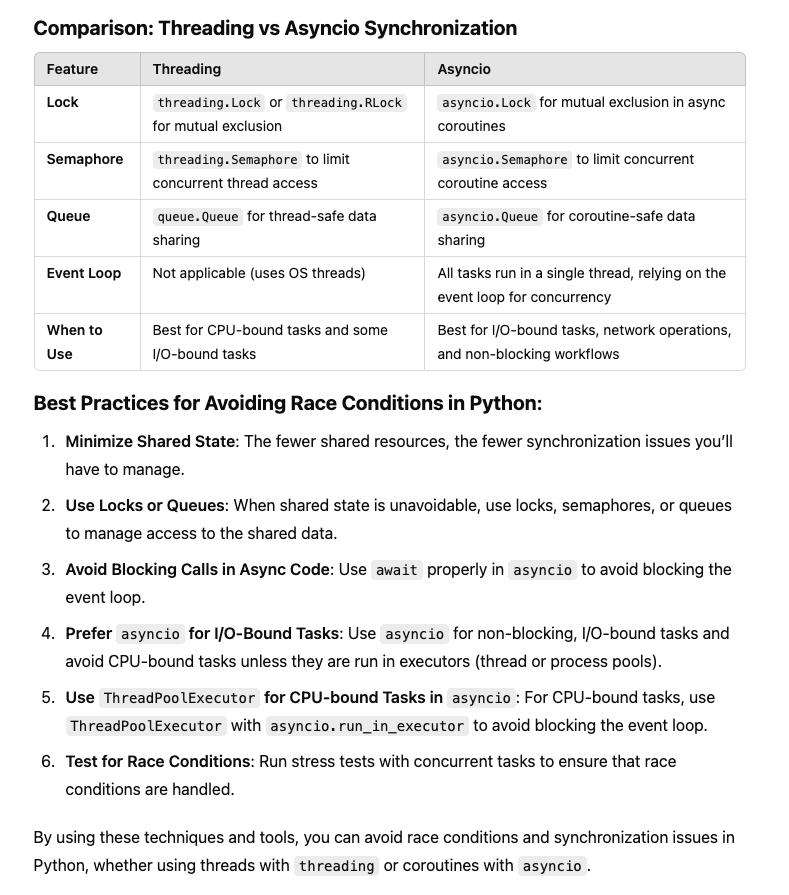
In Python, there are various techniques to avoid race conditions and address synchronization issues when working with both threading and asyncio.
- Handling Race Conditions with Threading
In threading, the Global Interpreter Lock (GIL) prevents true parallel execution of Python bytecode, but race conditions can still occur when threads manipulate shared resources. To prevent these, Python provides synchronization primitives.
Techniques for Avoiding Race Conditions in Threading:
-
Lock: A Lock ensures that only one thread can access a shared resource at a time.
-
RLock (Reentrant Lock): Similar to Lock, but allows a thread to acquire the lock multiple times. Useful in recursive functions.
-
Semaphore: Limits the number of threads that can access a resource concurrently.
-
Event: Allows threads to wait for certain conditions before proceeding.
-
Condition: More complex, providing finer-grained control over thread synchronization. Useful when multiple threads need to wait for some condition to be true.
Example -1: LC-1114 : Print in Order
Example -2: LC-1115 : Print FooBar Alternatively
GOOD READ - https://leetcode.com/problems/print-in-order/editorial/
Example using Lock in Threading:
import threading

shared_counter = 0
lock = threading.Lock()

def increment_counter():
    global shared_counter
    for _ in range(100000):
        with lock:  # Ensure only one thread modifies the counter at a time
            shared_counter += 1

# Create multiple threads
threads = []
for _ in range(10):
    thread = threading.Thread(target=increment_counter)
    threads.append(thread)
    thread.start()

# Wait for all threads to finish
for thread in threads:
    thread.join()

print(f"Final counter value: {shared_counter}")
In this example, the lock ensures that only one thread at a time can increment the shared_counter, avoiding race conditions.
Other Threading Primitives:
Queue: Often used to avoid race conditions when sharing data between threads.
Example:
from queue import Queue
import threading

q = Queue()

def worker():
    while not q.empty():
        item = q.get()
        process(item)
        q.task_done()

# Add items to the queue
for item in range(10):
    q.put(item)

# Create worker threads
for i in range(3):
    thread = threading.Thread(target=worker)
    thread.start()

# Wait for all items to be processed
q.join()
Semaphore Example:
import threading
import time

semaphore = threading.Semaphore(2)  # Allow up to 2 threads to access the critical section

def task():
    with semaphore:
        print(f"Task started by {threading.current_thread().name}")
        time.sleep(2)
        print(f"Task finished by {threading.current_thread().name}")

for i in range(5):
    thread = threading.Thread(target=task)
    thread.start()
- Handling Race Conditions and Synchronization in asyncio
In asyncio, race conditions can also occur when multiple coroutines access shared data concurrently. However, asyncio provides its own set of synchronization primitives.
Techniques for Avoiding Race Conditions in asyncio:
asyncio.Lock: Similar to threading locks, but works in an asynchronous context. It ensures that only one coroutine at a time can access a shared resource.
asyncio.Semaphore: Limits the number of coroutines that can access a shared resource concurrently.
asyncio.Queue: A thread-safe queue for asyncio-based tasks.
Example using:
asyncio.Lock :
import asyncio

shared_counter = 0
lock = asyncio.Lock()

async def increment_counter():
    global shared_counter
    for _ in range(10000):
        async with lock:  # Only one coroutine at a time can access this block
            shared_counter += 1

async def main():
    tasks = [increment_counter() for _ in range(10)]
    await asyncio.gather(*tasks)

asyncio.run(main())
print(f"Final counter value: {shared_counter}")
Here, async with lock ensures that only one coroutine can modify the shared_counter at a time, preventing race conditions.
Other asyncio Synchronization Primitives:
asyncio.Queue:
import asyncio

async def worker(queue):
    while not queue.empty():
        item = await queue.get()
        print(f"Processing {item}")
        queue.task_done()

async def main():
    queue = asyncio.Queue()

    # Add items to the queue
    for item in range(10):
        await queue.put(item)

    # Create worker tasks
    tasks = [asyncio.create_task(worker(queue)) for _ in range(3)]

    await queue.join()

asyncio.run(main())
asyncio.Semaphore:
import asyncio

semaphore = asyncio.Semaphore(2)  # Allow up to 2 coroutines to access the critical section

async def task():
    async with semaphore:
        print(f"Task started")
        await asyncio.sleep(2)
        print(f"Task finished")

async def main():
    tasks = [task() for _ in range(5)]
    await asyncio.gather(*tasks)

asyncio.run(main())
Advanced Synchronization Mechanisms:
Condition: A higher-level synchronization primitive that allows threads to wait for certain conditions to become true before proceeding. It’s useful when multiple threads must coordinate based on a shared condition.
Example: Multiple threads waiting for data to be available in a shared buffer.
import threading

condition = threading.Condition()

def producer():
    with condition:
        print("Producing data")
        condition.notify_all()

def consumer():
    with condition:
        condition.wait()  # Wait for the producer
        print("Consuming data")

threading.Thread(target=consumer).start()
threading.Thread(target=producer).start()
Event: An event object allows threads to communicate with each other by waiting for an event to be set, useful for signaling between threads
import threading

event = threading.Event()

def worker():
    print("Worker waiting for event...")
    event.wait()  # Wait until the event is set
    print("Worker finished")

def trigger_event():
    print("Event set after 2 seconds")
    event.set()  # Set the event, allowing the waiting thread to proceed

threading.Thread(target=worker).start()
threading.Thread(target=trigger_event).start()
- Thread Communication and Data Sharing:
queue.Queue for Thread-Safe Data Sharing: A thread-safe queue helps in sharing data between threads and ensures no race conditions occur while putting or getting items.
from queue import Queue
import threading

def worker(q):
    while not q.empty():
        item = q.get()
        print(f"Processing {item}")
        q.task_done()

q = Queue()
for i in range(10):
    q.put(i)

thread = threading.Thread(target=worker, args=(q,))
thread.start()
q.join()  # Wait until all items are processed
- Deadlocks and Their Avoidance:
Understanding Deadlocks: A deadlock occurs when two or more threads are waiting on each other to release locks. Learn how to avoid or detect deadlocks.
Deadlock Prevention: Proper lock acquisition ordering and using mechanisms like RLock to prevent deadlocks.
Timeouts in Locks: Using timeouts to prevent indefinite blocking in case of potential deadlocks.
import threading

lock = threading.Lock()

def worker():
    if lock.acquire(timeout=1):  # Avoid waiting indefinitely for the lock
        try:
            print("Lock acquired")
        finally:
            lock.release()
    else:
        print("Could not acquire lock")

thread = threading.Thread(target=worker)
thread.start()
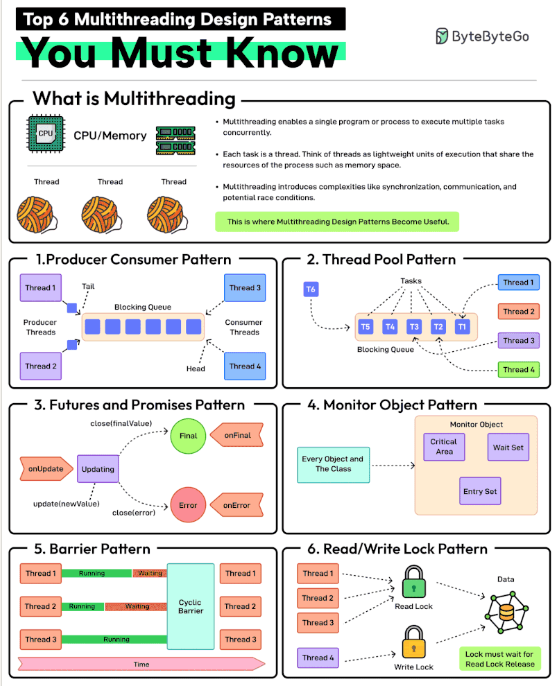
Top 6 Multithreading Design Patterns You Must Know
Multithreading enables a single program or process to execute multiple tasks concurrently. Each task is a thread. Think of threads as lightweight units of execution that share the resources of the process such as memory space.
However, multithreading also introduces complexities like synchronization, communication, and potential race conditions. This is where patterns help.
1 - Producer-Consumer Pattern
This pattern involves two types of threads: producers generating data and consumers processing that data. A blocking queue acts as a buffer between the two.
2 - Thread Pool Pattern
In this pattern, there is a pool of worker threads that can be reused for executing tasks. Using a pool removes the overhead of creating and destroying threads. Great for executing a large number of short-lived tasks.
3 - Futures and Promises Pattern
In this pattern, the promise is an object that holds the eventual results and the future provides a way to access the result. This is great for executing long-running operations concurrently without blocking the main thread.
4 - Monitor Object Pattern
Ensures that only one thread can access or modify a shared resource within an object at a time. This helps prevent race conditions. The pattern is required when you need to protect shared data or resources from concurrent access.
5 - Barrier Pattern
Synchronizes a group of threads. Each thread executes until it reaches a barrier point in the code and blocks until all threads have reached the same barrier. Ideal for parallel tasks that need to reach a specific stage before starting the next stage.
6 - Read-Write Lock Pattern
It allows multiple threads to read from a shared resource but only allows one thread to write to it at a time. Ideal for managing shared resources where reads are more frequent than writes.