

How to Setup Convenient Project for Leetcode Problems? (Debugging, TestCases)

In order to concentrate on problem solution, I think that convenient project structure is important.
For C#, I organized my project in next way:
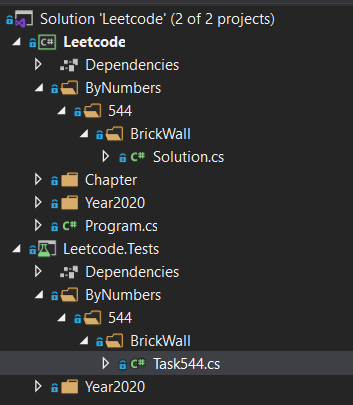
and I use NUnit + FluentAssertions for writing test cases.
E.g. of task solution and test
using System;
using System.Collections.Generic;
using System.Text;

namespace Leetcode.Year2020.July.Task3392
{
    public class Solution
    {
        public double MyPow(double x, int n)
        {
            return Pow(x, n);
        }

        private double Pow(double x, long n)
        {
            if (n < 0)
            {
                if (n == int.MinValue)
                {
                    return 1 / Pow(x, (long)int.MaxValue + 1);
                }
                return 1 / Pow(x, -1 * n);
            }

            if (n == 0)
            {
                return 1d;
            }

            if (n % 2 == 1)
            {
                return x * Pow(x, n - 1);
            }

            return Pow(x * x, n / 2);
        }
    }
}
using System;
using System.Collections.Generic;
using System.Text;
using FluentAssertions;
using Leetcode.Year2020.July.Task3392;
using NUnit.Framework;
namespace Leetcode.Tests.Year2020.July
{
[TestFixture]
public class Task3392
{
[Test]
[TestCase(2d, 10, 1024d)]
[TestCase(2.1d, 3, 9.261d)]
[TestCase(2d, -2, 0.25d)]
[TestCase(2d, 0, 1d)]
[TestCase(1d, -2147483648, 1d)]
[TestCase(-1d, -2147483648, 1d)]
public void Test(double x, int n, double output)
{
var s = new Solution();
Math.Round(s.MyPow(x, n), 5).Should().Be(output);
}
}
}And I am quite happy with my C# setup, becuse it allows me to run tests quickly and easily debug them:
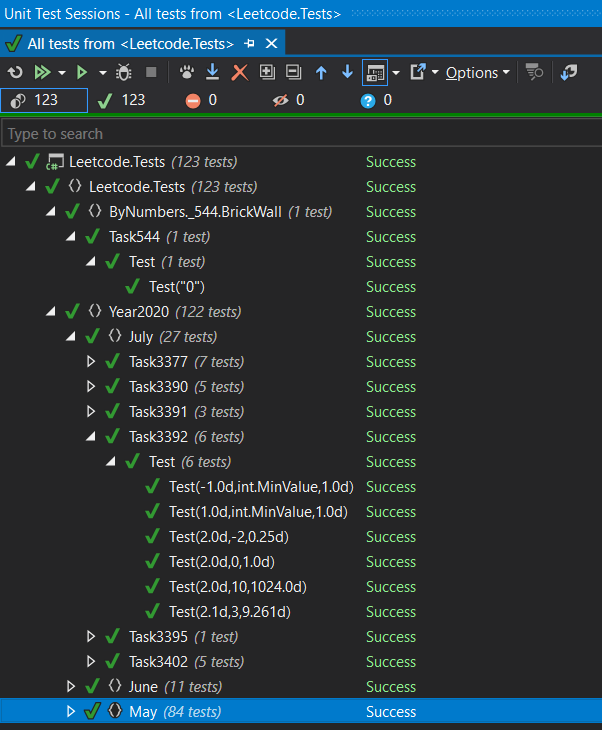
For TypeScript of course I have different setup.
packages.json:
{
  "name": "leetcode",
  "version": "1.0.0",
  "description": "leetcode challenges",
  "main": "index.js",
  "directories": {
    "test": "tests"
  },
  "dependencies": {},
  "devDependencies": {
    "@types/expect": "^24.3.0",
    "@types/mocha": "^9.0.0",
    "chai": "^4.3.4",
    "mocha": "^9.1.3",
    "ts-mocha": "^8.0.0",
    "typescript": "^4.5.2",
    "typescript-require": "^0.3.0"
  },
  "scripts": {
    "test": "mocha --reporter spec src/test/**/*.js "
  },
  "repository": {
    "type": "git",
    "url": ""
  },
  "author": "Anton Tishchenko",
  "license": "ISC"
}
tsconfig.json:
{
  "compilerOptions": {
    "target": "ES2016",                                     /* Set the JavaScript language version for emitted JavaScript and include compatible library declarations. */
    "esModuleInterop": true,                             /* Emit additional JavaScript to ease support for importing CommonJS modules. This enables `allowSyntheticDefaultImports` for type compatibility. */
    "forceConsistentCasingInFileNames": true,            /* Ensure that casing is correct in imports. */
    "strict": true,                                      /* Enable all strict type-checking options. */
    "skipLibCheck": true                                 /* Skip type checking all .d.ts files. */
  }
}
E.g. of task solution and test
export function rob(nums: number[]): number {
    let prevMax = 0;
    let currMax = 0;
    for (let i = 0; i < nums.length; i++) {
        const temp = currMax;
        currMax = Math.max(prevMax + nums[i], currMax);
        prevMax = temp;
    }
    return currMax;
};
var assert = require('assert');
var houseRobber = require('../../../code/by-number/198-house-robber/solution.js');
describe('198. House Robber', function () {
describe('Given an integer array nums representing the amount of money of each house', function () {
it('should return the maximum amount of money you can rob tonight without alerting the police.', function () {
var result = houseRobber.rob([1,2,3,1]);
assert.deepEqual(result, 4);
var result = houseRobber.rob([2,7,9,3,1]);
assert.deepEqual(result, 12);
});
});
});I start TypeScript compilation using npx tsc -w and I run tests by npm test
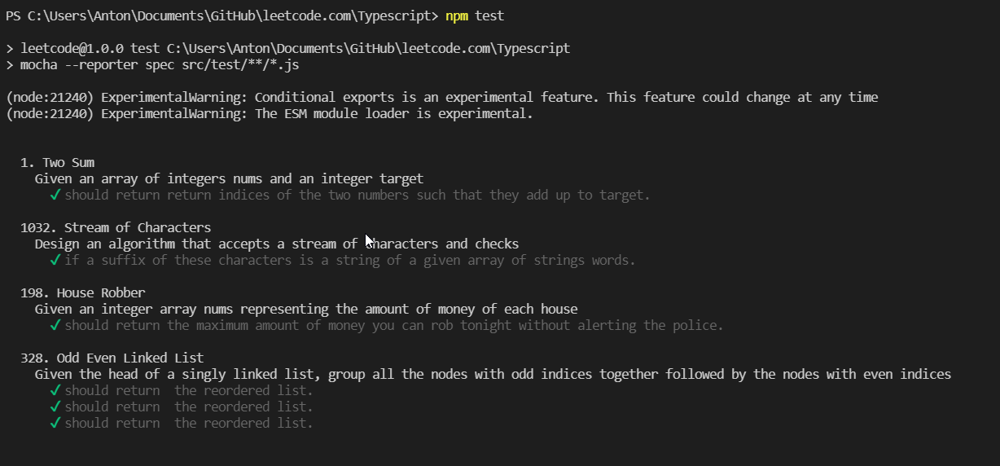
But that is not a very convenient setup for TypeScript. Not convenient to debug, run particular test, etc.
How do you setup your local projects for convenient debussing and writing test cases?
Comments (5)